Changelog
Product updates, new features, and release notes
Take text out of the Markdown preview — with its formatting, in the colours of wherever you paste it.
✦ Copy from the Markdown preview
- Select and copy in the preview. Click into it and press ⌘A / Ctrl+A, or drag across the part you want.
- Right-click for Copy all and Select all — one click for the whole document.
- Headings, bold, lists, tables, links and emoji survive the paste into Word, Mail or Pages. The colours do not: what you paste takes the colours of the target document, so it works in a light and in a dark one.
- Editing stays on the left, as before.
◆ Fixed
- The macOS disk image now shows the Commander icon instead of the plain grey drive.
Markdown files open in their own tab — text and live preview side by side.
✦ Markdown in its own tab
- Double-click a local .md file (also .markdown, .mdown, .mkd) to open it in its own tab: text on the left, live preview on the right, scrolling together.
- Edit and save with ⌘S / Ctrl+S. Saving asks first, line endings are kept, and a file that was changed on disk in the meantime is not overwritten.
- The preview is sanitized, so a Markdown file can’t run scripts in Commander. Links open in your browser.
- Open .md files from Finder or Explorer in Commander. Commander asks once whether it should become your default Markdown app — on macOS it sets it directly, on Windows it opens Settings → Default apps, where Commander is already listed. Nothing changes without your yes.
Compare folders right in the two panes, see two files side by side and carry changes across block by block.
✦ Folder compare
- Compare the two panes with the ⇋ button: folders expand in place, both sides stay aligned row by row, and a hatched row marks where a file is missing on one side. No third folder, no extra window.
- Filters for differences, everything, left only and right only; expand or collapse all; ↑ marks the newer file.
- Changing the folder on either side — address bar, ↑, favourites or swap — compares again straight away.
- Local folders for now.
✦ File compare
- Double-click a differing file to open both versions side by side in their own tab, with line numbers. Long lines wrap instead of pushing the other side out of view.
- Show everything, only the differences, or the differences with three lines of context; jump from block to block.
- Copy a block to the other side with one click: hover a difference and click the arrow in the margin — or use ◀ / ▶ in the toolbar or the right-click menu. Undo included.
- Saving always asks first. Line endings, the final newline and file permissions are kept, and a file that was changed on disk in the meantime is not overwritten.
✦ 3-way merge
- Carry your own changes into a new version of a file: Base, Mine and Theirs are merged line by line, and only real conflicts are left for you to decide. Optionally, Claude can suggest a resolution — only the conflicting sections are sent.
◆ Fixed
- Dropping a folder onto the address bar on a Retina display opens that folder instead of copying it.
- The close buttons on tabs are larger and easier to hit.
- Windows: the Defender helper messages are now translated into all 20 languages.
The licence check can no longer lock you out, and it asks far less often.
◆ Fixed
- A problem on the licence server no longer counts as an invalid licence. If the server does not answer, or its daily request budget is used up, Adelvo Commander carries on with the last confirmed licence instead of locking you out.
- Machine limit reached is now reported as exactly that, instead of failing silently.
- A key that cannot possibly be valid is recognised before anything is sent, and an already stored key is never replaced by an unverified one.
✦ Changed
- The licence is checked once a day at most — previously every start of the app asked again.
- Trials no longer contact the licence server at all. The expiry date is known locally, so a running trial needs no network.
- A key entered while the server is unreachable is accepted provisionally for 24 hours and confirmed later. An explicit “invalid” or “suspended” still takes effect immediately.
Drag & drop between the two panes works on Windows again — plus resizable columns and a few niceties.
✦ Panes & navigation
- Resizable columns: drag the right edge of the Size, Perms or Modified column — widths are remembered. The date column is wider now, so the time is visible.
- Type
~(or~/Documents) in the address bar to jump to your home folder.
◆ Fixed
- Windows drag & drop: copying files between the two panes by dragging works again. Windows’ own file-drop had been intercepting the window’s drag & drop; that is now handed back to the app. (In exchange, dropping files from Explorer into the window is off on Windows; macOS is unchanged.)
- Windows: the window size and position are remembered again after you close the app.
Quicker navigation, tidier favourites, and a Defender hint that stays quiet once handled.
✦ Address bar & favourites
- Drag a folder onto the address bar to jump straight there.
- Right-click a favourite — or a server bookmark — to remove it. Handy for clearing out paths that no longer fit after importing settings.
◆ Fixed
- After you add a Windows Defender exception from the app, the hint no longer comes back on the next start — the app remembers the folders you excluded, even where a non-elevated read can’t see them.
Faster Windows backups, and the little things that make them just work.
✦ Windows Defender helper
- Windows Defender scans every copied file, which can slow a backup enormously. A one-click helper adds your source and target as Defender folder exceptions (one UAC prompt) — it confirms success in the same elevated step, only appears when real-time protection is actually on, and stays quiet once handled. Opt-in, with a clear disclaimer.
✦ Smoother navigation
- A missing target folder is created on the first backup instead of stopping.
- Switching drives on Windows (for example to
D:) no longer lands you back onC:. - Windows terminal: Ctrl+C copies the selection (or interrupts when nothing is selected), Ctrl+V pastes.
Take your setup to another machine — and the real Windows icon.
✦ Export & import settings
- Save your backup plans, SSH connections and saved paths to a single file and load them on another computer (Settings › Backup & connections). Ideal for moving from your Mac to a Windows PC.
◆ Fixed
- The Windows app now shows the real Adelvo icon.
Backups now check that source and target are actually there — before comparing.
✦ Reachability check before compare
- Before a comparison, both source and target are verified: the path exists, is an actually-mounted volume (not a stale/ghost mount point), and is readable. If not, you get one clear “can’t read — not mounted / no access” message, instead of the compare silently reporting “everything is new.” Source and target, locally and over SFTP.
A cleaner backup dialog and a mirror-delete fix.
✦ Simpler sync dialog
- The backup dialog now opens on Synchronization (mode, delete policy, compare method) and has just two tabs — Synchronization and Filter. You see whether it’s Update or Mirror, and Trash or Permanent, before you compare and run.
◆ Fixed
- A mirror sync could leave folders behind with “directory not empty” when they still held an excluded file (e.g. a
.DS_Storeyou’d added to the junk list). A folder that is being deleted now clears such leftover excluded junk with it, so the cleanup completes — locally and over SFTP.
One-click junk-exclude presets for backups.
✦ Junk exclude presets
- The backup filter now has one-click 🧹 macOS and 🧹 Windows buttons that add the usual throwaway patterns (
.DS_Store,.Spotlight-V100,Thumbs.db,$RECYCLE.BIN…) to the exclude list — your current OS’s button comes first. They append without duplicates, so you can combine both for a cross-platform drive.
A “New preset” button for backups, and the write-access check now covers copies too.
✦ New (empty) preset
- The backup dialog now has a ➕ New button that clears the form to a blank plan — start a fresh sync job without having to duplicate an existing one first.
✦ Write-access check for copies too
- The clear “no write access” check (added in 1.0.19 for syncs) now also runs before a drag-and-drop copy: a read-only volume (e.g. NTFS), permissions/ownership, or an unmounted drive gives you one clear message instead of an error for every file — and never an accidental write to your boot disk.
Backup smarts: an include mode for the folder tree, and a clear “no write access” check before a sync starts.
✦ Include mode in the folder tree
- The visual folder tree now has an Include mode next to Exclude: check only the folders you want to sync (a positive list) instead of unchecking what to skip. On a huge tree that’s dramatically faster — the scan only descends into the folders you picked. The tree reflects your existing include list when you open it.
✦ Write-access check before a sync
- Before a sync runs, the target is tested for write access. If it isn’t writable — a read-only volume (e.g. NTFS), permissions/ownership set by another tool, or a drive that isn’t mounted — you get one clear “no write access” message instead of an error for every file. And it never accidentally writes to your boot disk when a volume is missing.
A tiny sync display fix.
◆ Fixed
- After a fast sync finished, the progress dialog could stay stuck on “waiting for drive…” because a trailing progress update arrived just after completion. The dialog now always shows the final result.
A small backup fix: deletions to the recoverable trash never get skipped anymore.
◆ Fixed
- During a mirror sync, a file moved to the recoverable trash is now renamed on a name clash (
… 2,… 3) instead of being skipped — so a file or bundle (for example a.utmpackage) with the same name already sitting in the trash no longer blocks the cleanup. Works locally and over SFTP.
Two terminals per tab, drag a path into the terminal, multi-select delete, and dialogs that close on your terms.
✦ A local and a server terminal in the same tab
- “Open terminal here” now opens a terminal for that side — so a connected tab can hold a local shell and a server (SSH) shell at once. Open it on the local pane for a local shell, on the server pane for the server; each drops into the folder you’re browsing.
✦ Drop a file onto the terminal
- Drag one or more files or folders from a pane onto the terminal to insert their (shell-quoted) paths at the cursor — no more typing long paths.
✦ Delete a whole selection
- Delete now removes every selected item, not just the one under the cursor — with a single confirmation.
✦ Dialogs on your terms
- The copy-result and error dialogs auto-close after a delay you set in Settings — or 0 to keep them open until you close them. Folder-creation errors (e.g. permission denied) now surface as a dialog, not just in the status bar.
A per-tab terminal (local & server), archive extraction, and copy-path — right where your files are.
✦ Terminal, per tab
- Open a shell in the current folder — the ⌨ button, right-click “Open terminal here”, or Ctrl+`. Local folders open a local shell; a server tab opens an SSH shell in the browsed folder. Each tab keeps its own terminal, so a local and a server terminal run side by side. Follows your color scheme, zoomable.
✦ Extract archives
- Double-click (or right-click → Extract here) a server
.zip/.tar/.tar.gzto unpack it straight on the host — into a new folder, no download. Locally, double-click extracts via the system as before.
✦ Copy path
- Copy a file or folder path from the right-click menu, with ⌥⌘C, or by clicking the path in the Info window.
◆ Fixed
- Copy errors now name the reason (e.g. “permission denied”) instead of just a count.
- With the terminal open, the file list no longer hides its last rows — it stays scrollable and the command bar stays visible.
- A rendering glitch in the file-list header row.
A built-in SSH terminal — a real shell on the server you're already connected to.
✦ Built-in SSH terminal
- Open a full terminal on the connected server — same login, no second tool. Ideal for a quick
unzip,taror a restart, right where your files are. - Follows your color scheme, with a palette that stays readable on both light and dark schemes.
- Zoom the terminal text with ⌘+ / ⌘− / ⌘0 or the A− / A+ buttons.
▸ Also new
- Text zoom for the dual-pane file lists too (A− / A+ buttons, or ⌘+ / ⌘− / ⌘0) — and it's remembered.
- Session restore: your open tabs come back on the next launch.
▸ Faster launch
- The color scheme is applied immediately and the license check runs in the background — no theme flash when opening.
✦ Carbon Copy Cloner import & safer deletes
- Import Carbon Copy Cloner tasks (
.ccctask) as sync plans. - Clear warnings before deletes on network drives and permanent deletes.
- Exclusion filter with a live match list, so you see exactly what a rule catches.
✦ Fast copy engine
- Overlapped read/write pipeline reaches FreeFileSync-class speed on fast drives.
- Live byte progress, throughput and ETA; stop or cancel at any time.
- Skipped-items report for protected paths, with a Full Disk Access shortcut.
The fourth arm of the knife: backup & sync, FreeFileSync-style.
✦ Backup & sync
- Named sync jobs — update or mirror, local or over SFTP.
- A mandatory compare preview before anything changes; deletes go to a recoverable trash, even on network drives.
- AI-suggested exclusion filters from a plain-language description.
✦ 20 languages
- Full localization in 20 languages, switchable live from Settings.
✦ Host-key verification & rule-based rename
- Known-hosts host-key checking with trust-on-first-use and a clear warning if a key changes.
- Rule-based batch rename (find/replace + numbering) alongside AI rename — always with a preview.
✦ Self-update & edit-in-place
- Built-in updater installs new versions in place.
- Edit a remote file in your editor and it re-uploads automatically on every save.
First release — a dual-pane file manager built as the WinSCP replacement I actually wanted.
✦ Initial release
- Dual-pane SFTP client with tabs and saved sessions (passwords in the macOS keychain).
- Classic local dual-pane file manager — copy, move, edit, delete, permissions (chmod).
- AI batch rename that can read EXIF and ID3 metadata; WinSCP.ini import.
- macOS (Apple Silicon & Intel) and Windows — signed & notarized.
New mic tools — a feedback destroyer and a low-cut filter. MixDesk X keeps growing into the software system processor that replaces the 19″ rack: after the 31-band EQ, RTA, active crossovers and measured delay alignment, every microphone channel now has automatic feedback suppression and a rumble filter.
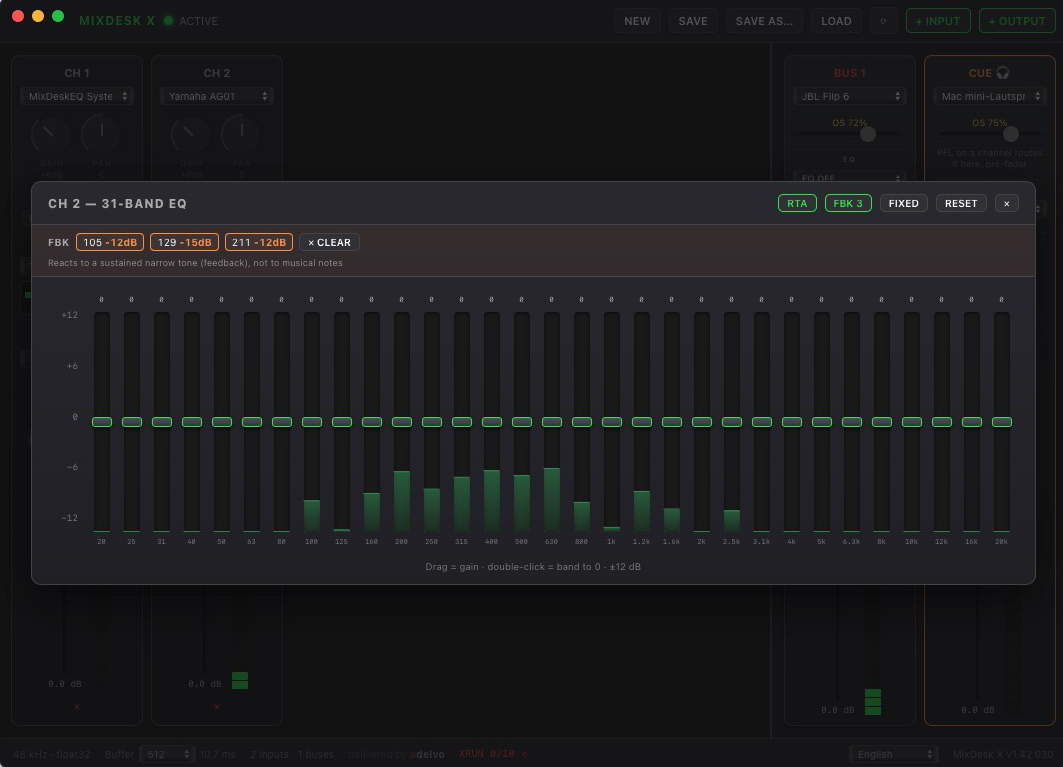
✦ Feedback Destroyer
- Automatic feedback suppression per mic channel (armed from the 31-band EQ): it watches for a sustained feedback tone that sits on one exact frequency and drops a narrow notch on it — while your voice, which drifts in pitch, is left alone.
- Two modes like a hardware AFS: LIVE places adaptive notches that release again once the frequency goes quiet; FIXED is for ringing out a soundcheck — raise the gain slowly and it parks filters as tones appear, buying you headroom before feedback.
- Honest by design: a software processor at the very end of the chain will not out-react a hardware DriveRack at the absolute feedback edge — it raises your threshold, it does not work miracles. Pair it with the low-cut.
✦ Low-Cut / rumble filter
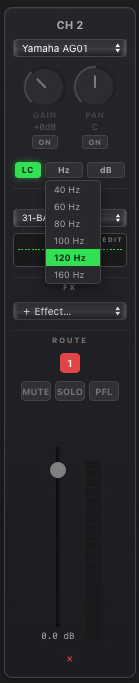
- A switchable high-pass on every input channel — 40 to 160 Hz, 12 or 24 dB/oct (Butterworth). It sits first in the channel, before the feedback destroyer and EQ.
- Strips microphone rumble, handling noise and low-frequency feedback with zero latency — the reliable fix for the low-end drone a detector can never chase fast enough.
- The clean split: the low-cut kills the lows, the destroyer handles the mid-range whistles. Saved in presets.
 ⬇ Download MixDesk X (macOS · Windows x64 · Windows ARM64)
Language offensive — 16 UI languages. Seven new interface languages join the console: Suomi, Svenska, Polski, Čeština, Dansk, Nederlands and Română — alongside English, Deutsch, Español, Français, Italiano, Português (BR), 日本語, 한국어 and 中文.
- All tooltips, dialogs, toasts and warnings are fully translated — including the new X-OVER and ALIGN features from v1.42.028.
- The operational console labels (MUTE, SOLO, PFL, EQ, FX, GAIN, PAN, DELAY, LIMITER…) deliberately stay in English — the same convention as on hardware consoles worldwide, and it keeps the strips compact.
- Switch languages any time in the footer; the choice is remembered.
Active crossovers and measured delay alignment — MixDesk X now covers the two jobs you used to need a hardware speaker processor for: splitting the signal into sub/top (or full 3-way) ways across buses, and time-aligning any output by actually measuring it with a microphone. Even Bluetooth speakers.
✦ Active crossover on every bus (X-OVER)
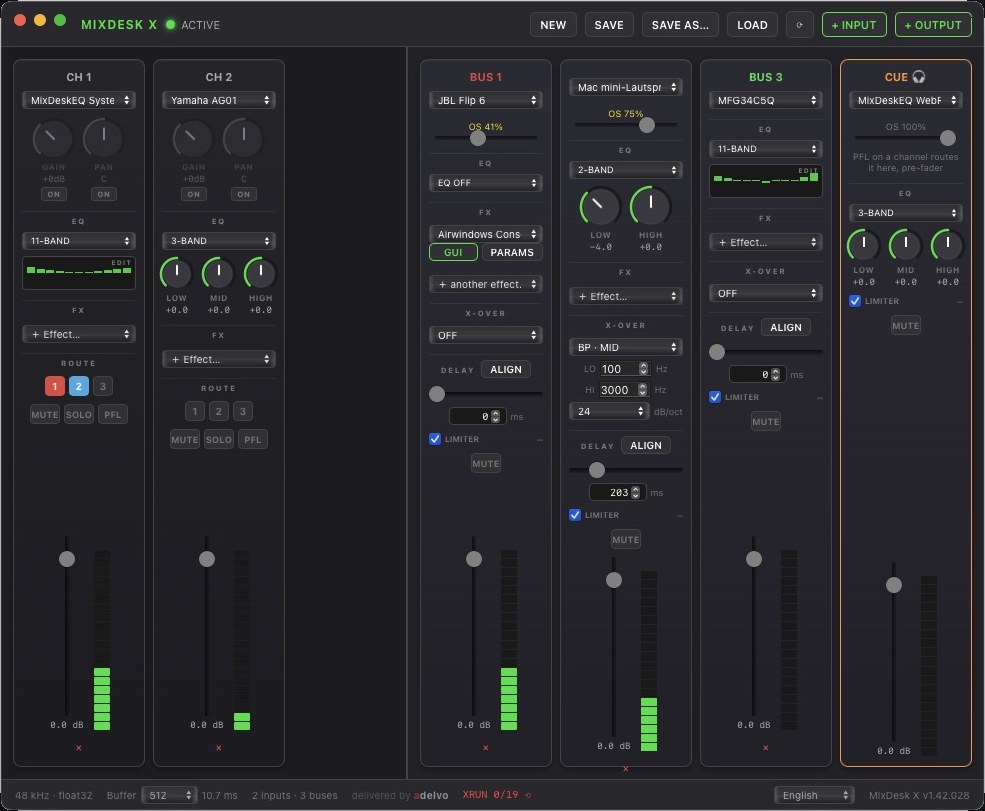
- Three modes per bus: LP · SUB (lowpass), HP · TOP (highpass) and BP · MID (bandpass with two crossover frequencies) — enough for 2-way sub/top splits and full 3-way + sub systems, each way on its own bus and output device.
- Linkwitz-Riley slopes of 12, 24 or 48 dB/oct — the live-sound standard: both ways sum flat and in phase at the crossover point. The 12 dB/oct case inverts the sub way internally, exactly like hardware crossovers do.
- Sits after EQ and effects, before the bus delay — so RTA and Auto-EQ keep measuring full-range.
- Crossover settings are saved in presets; old presets load unchanged with the crossover off.
✦ Delay measurement & one-click alignment (ALIGN)
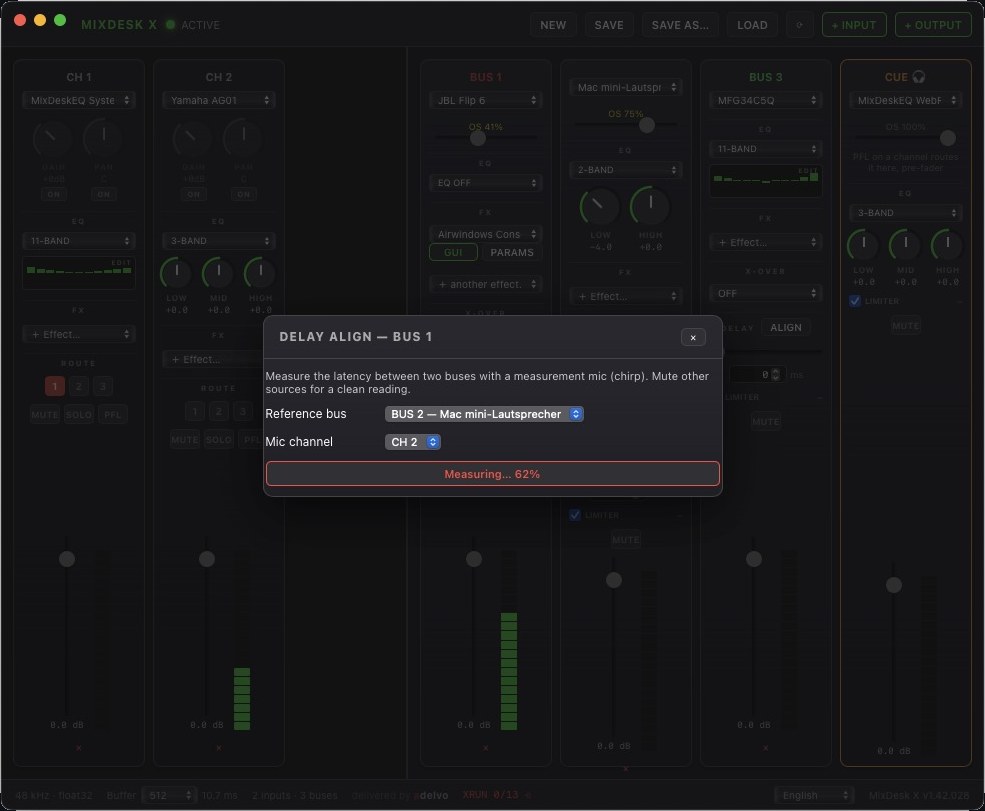
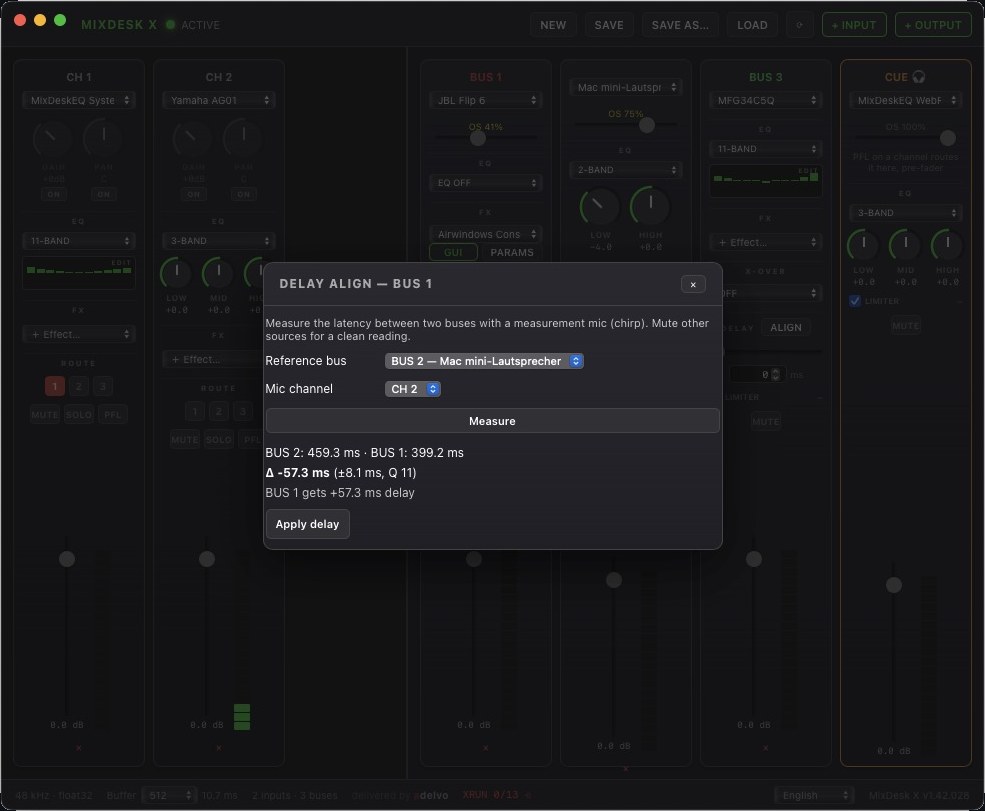
- Measure instead of guessing: the new ALIGN button next to each bus delay plays a short measurement chirp alternately through a reference bus and the selected bus, picks it up through any input channel (your measurement mic) and locates it with an FFT matched filter — sample-accurate.
- Made for Bluetooth: BT speakers arrive tens to hundreds of milliseconds late, and the latency changes on every reconnect. Measure, click apply, done — the earlier way gets the delay, nothing is changed until you confirm.
- Four measurement passes with median and an honest ± spread readout, plus a signal-quality gate that tells you when the mic did not hear the chirp instead of applying nonsense.
- Works for crossover ways too: measure sub against top and your active system is time-aligned with the same three clicks.
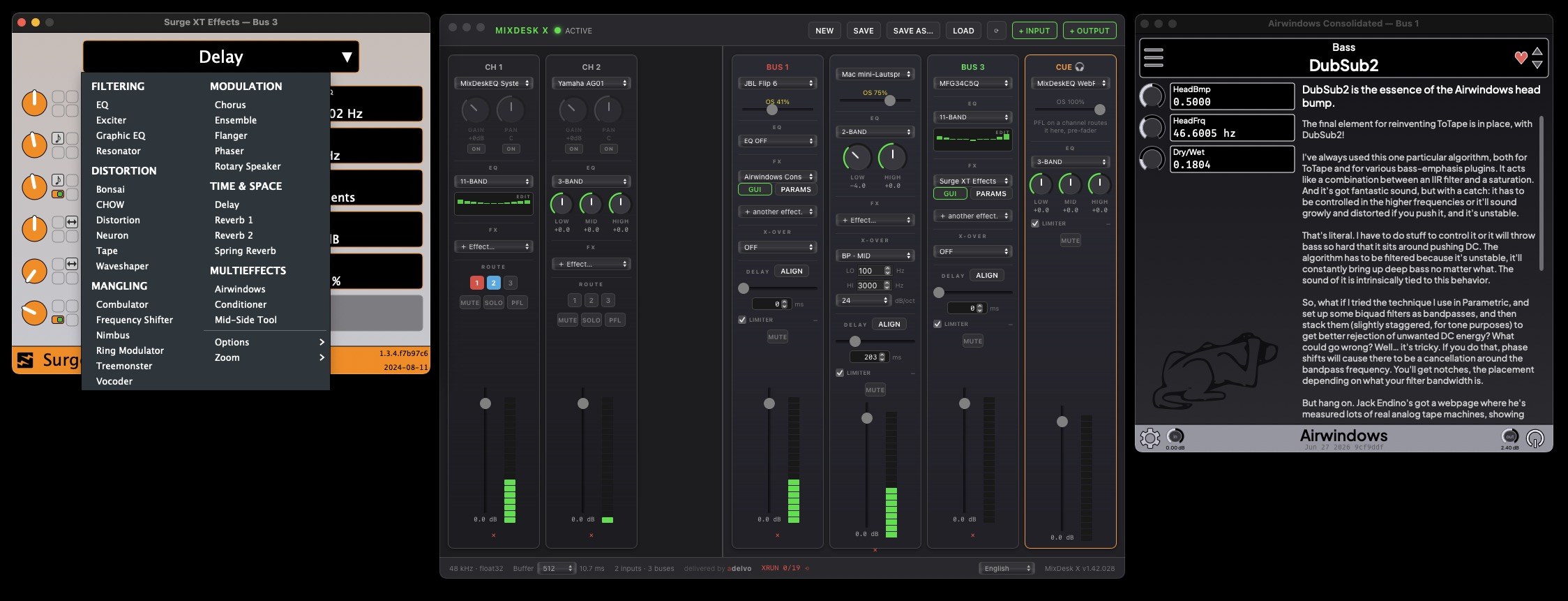
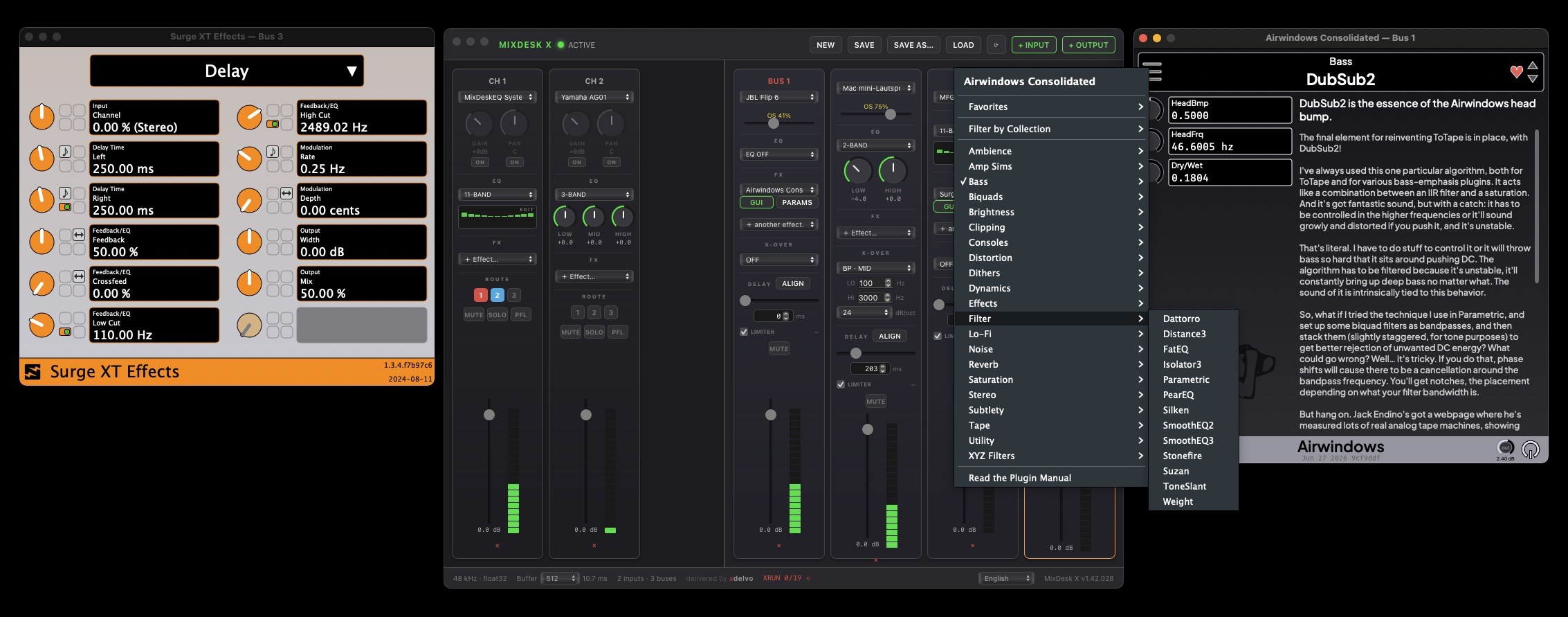
✦ The whole console in one picture
Crossovers, measured delays, and CLAP effects side by side — Surge XT and Airwindows Consolidated running as bus inserts around the new X-OVER and ALIGN sections:
Also part of the recent updates: in-app updates on macOS and Windows (v1.42.026) and downloads served directly from adelvo.io with GitHub as full mirror and fallback (v1.42.027).
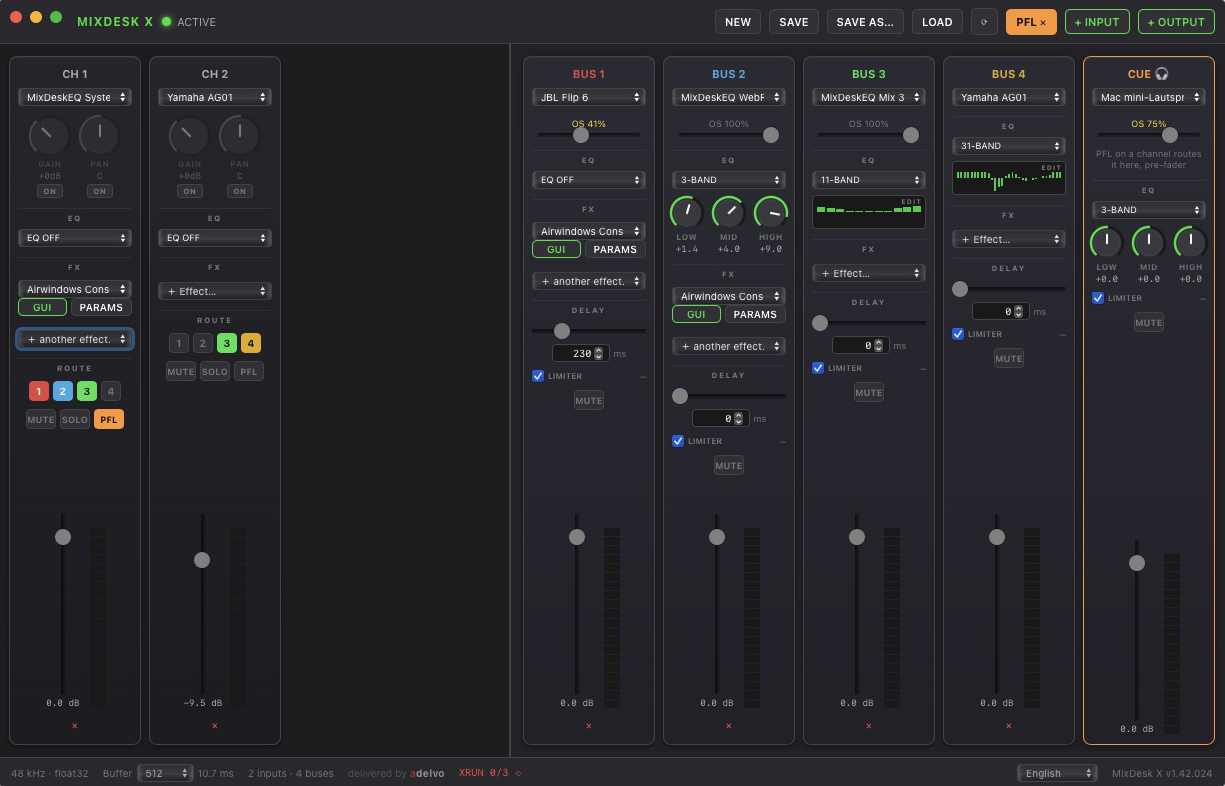
⬇ Download MixDesk X (macOS · Windows x64 · Windows ARM64)PFL & cue — a real headphone section. Every channel strip gets a PFL button, and a new orange CUE strip becomes your dedicated headphone output — exactly like the solo bus and phones section on a hardware console. Check any signal before it goes anywhere near the program mix.
✦ PFL on every channel
- Pre-fader listen: press PFL and the channel is routed to the cue — trim yes, fader/pan/mute no. The classic "is there even signal?" check.
- Works on muted channels: no more pushing a caller onto the live mix just to find out whether their line is alive.
- Multiple PFLs sum like a console solo bus; a PFL ✕ button in the header clears them all with one click — nothing stays latched mid-show.
- PFL is a momentary operating state — deliberately never saved in presets.
✦ CUE — a dedicated headphone output
- An extra output with its own device picker — it does not consume any of your 16 buses.
- Full monitoring kit: OS volume slider, correction EQ (2/3/11/31-band), safety limiter with gain-reduction readout (ear protection, on by default), mute, fader and meter.
- Deliberately no delay and no FX chain — the monitoring path should show you what is there, not color it.
- Cue settings live in presets; old presets load unchanged with the cue off. Device recovery works like buses, and MixDesk X warns you if the cue device is already used by a bus.
Up to 16 output buses — the output section is no longer capped at 4. Dedicated mix-minus feeds for call guests, separate monitor sends, zone outputs: monitoring and program no longer compete for four slots.
- Each new bus gets its own color; the ROUTE buttons on the channel strips wrap into extra rows as the bus count grows.
- Existing presets load unchanged — the preset format was always bus-count-agnostic. Same limit on macOS and Windows.
- Fixed: loading a preset while a channel's input device was unplugged showed that channel's meter pinned at full scale — looking alarmingly like feedback. It now correctly rests at silence until the watchdog reconnects the device.
See (and ride) the hidden macOS device volume — macOS keeps a separate volume for every output device, and it sits behind the bus fader. If your headphones were last used at 31%, every bus routed to them is quietly attenuated — and no mixer UI tells you why. Now MixDesk X does.
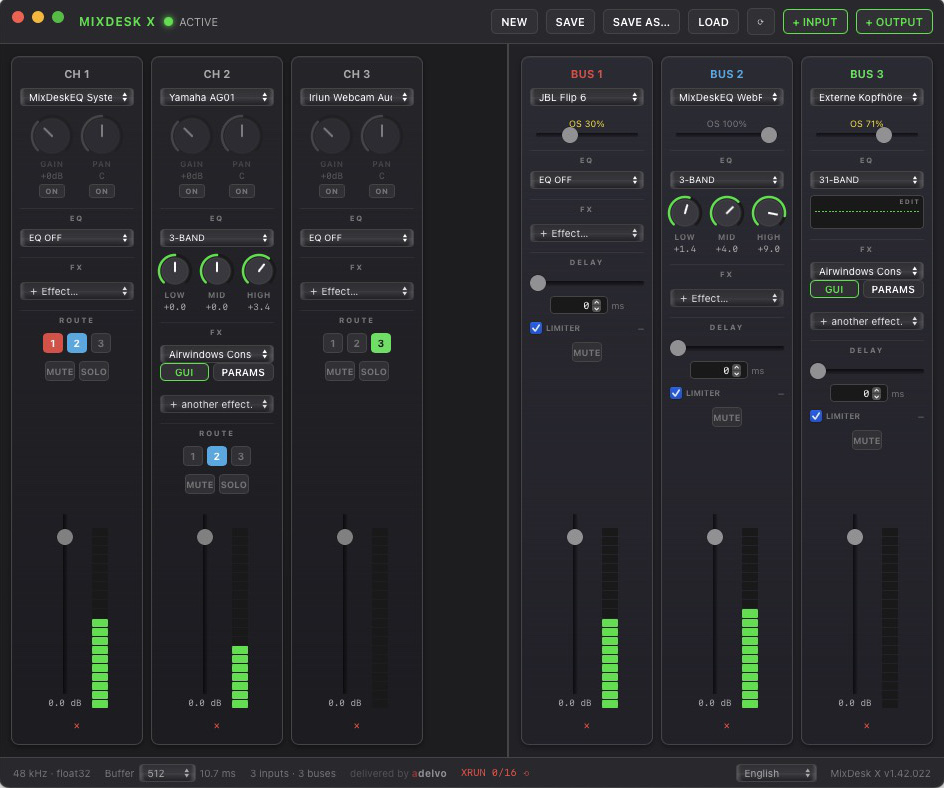
✦ OS volume slider on every bus
- Where: a small "OS xx%" slider appears below the device picker whenever the selected output has a macOS volume control — yellow while below 100%.
- Ride it or clear it: drag to set the device volume right from the strip; double-click snaps to 100%. Changes made elsewhere (System Settings, the knob on a Bluetooth speaker) show up within seconds.
- When the device is your destination (headphones, a Bluetooth speaker): the OS stage is a perfectly good listening control — now with visible context.
- When the signal travels on (line-out into a desk, an interface, another app): keep it at 100% = bit-transparent, and do your riding on the bus fader. The slider makes sure you see when that stage isn't clean.
- No slider? The device only has a hardware knob (many USB DACs) — there is no macOS stage to worry about. macOS only for now.
Save As & bulletproof preset loading — presets now survive missing and re-plugged devices, and managing multiple mixer setups is finally first-class.
✦ What changed
- SAVE AS… button in the toolbar plus
Cmd/Ctrl+S(save) andShift+Cmd/Ctrl+S(save as) — keep separate presets per show, studio or stream. - Missing devices don't kill the preset anymore: everything loads with all settings, a toast names the absent device, and the moment it comes back the channel or bus reconnects automatically.
- Re-plugged into another port? Device IDs can change with the port — presets now also store the device name and re-match by it.
- No silent fallback to the default output: a missing device shows as "⚠ device missing" instead of visually snapping to default — which could route a bus straight into its own capture source (feedback loop).
- New "(no output)" option: a bus can deliberately run without an output device — for processing or standby buses.
Fix: distorted/quiet output on some USB DACs (macOS) — if one specific output device sounded quiet, distorted or triggered constant crackle warnings while being perfectly fine as a direct system output, this was for you.
✦ The special case, explained
- Some USB DACs advertise 16-bit modes alongside their 32-bit/float modes. The audio backend preferred 16-bit internally on such devices — and its converter then pulled audio at exactly double speed, draining MixDesk X's buffers twice as fast as they filled.
- MixDesk X now opens such devices in their native 32-bit format and converts itself — the broken path is never in the signal chain. Float-native devices and Windows were never affected.
Mic calibration files — the Auto-EQ now reads your measurement mic's calibration file (UMIK-1 / REW format), so the room measurement is corrected for the mic's own response.
✦ How it works
- Where: open a bus EQ in 31-band mode → AUTO-EQ → pick your measurement mic channel → click 🎤 CAL and select the calibration file. The file name appears next to the button; × removes it.
- Supported format: plain-text frequency/dB pairs — exactly what miniDSP ships with the UMIK-1 and what REW uses (
.txt,.cal,.frd). Header and comment lines (*,",;,#, "Sens Factor") are skipped automatically; comma decimals are fine. - What it does: the curve is interpolated (log-frequency) onto the 31 ISO terz bands and subtracted from the analyzer readings of that channel — the live RTA display AND the Auto-EQ measurement both use the corrected values, the same way REW applies cal files.
- Scope: per measurement channel, active for the running session. No file loaded = uncorrected readings, exactly as before.
The software DriveRack — MixDesk X now measures rooms and corrects them: 31-band terz EQ, a live spectrum analyzer behind the bands, and a one-click Auto-EQ.
✦ Features
- 31-band terz EQ (ISO 1/3-octave, 20 Hz–20 kHz) as a fourth EQ mode on every channel and bus — switching 11↔31 band resamples the curve so the shape survives
- RTA: live 1/3-octave spectrum rendered directly behind the EQ bands — same ISO bands, aligned 1:1, zero CPU cost while the editor is closed
- Auto-EQ (bus editors): pink noise on the bus, measured through any mic input channel, averaged and inverted onto the 31 bands — boost capped at +6 dB so it never fights a room null, cut down to −12 dB, cancel restores everything
- Rename channels with a double-click on the name — name your measurement mic properly
⚠ Fixes
- New channels are no longer all named "CH 1" after loading a preset — numbering continues correctly
MixDesk X — the free mixing console for macOS & Windows, and the successor to MDE — Mix Desk EQ. Route any input to up to 4 stereo output buses with EQ, per-bus delay, safety limiter, and CLAP effect chains.
⬢ Highlights
- Cable-free system & per-app audio capture on both platforms. Windows 10 2004+ via WASAPI Process Loopback, macOS 13+ via ScreenCaptureKit — no virtual cable, no driver. MixDesk X excludes its own output, so capturing can never feed back.
- CLAP plugin host in every strip — native plugin GUIs, state saved in presets, one-click install of the free Airwindows Consolidated pack (~400 effects).
- Per-bus delay 0–1000 ms — sync Bluetooth and wired speakers playing the same source.
- Free. No account, no ads, no Pro tier. 9 UI languages. Signed & notarized.
All MixDesk X releases & notes on GitHub →
v1.4 — wireless mic, dictation and iCloud for the Mac. Your iPhone becomes a wireless microphone and dictation remote for LLT Desktop, with everything syncing to iCloud and a built-in viewer for your saved transcripts.
★ New in v1.4
- iPhone as a wireless mic for LLT Desktop — stream your iPhone mic to the Mac over Wi-Fi and remote-start it in Translate or Dictate mode. A reliable replacement for Continuity.
- Dictation mode — spoken text is typed straight into the focused app on the Mac (via the companion), or saved on the iPhone as a note: original, translation, or both.
- iCloud sync — transcripts and dictation notes are stored in iCloud Drive (the “LLT Mobile” folder) so they appear on your Mac automatically.
- Built-in TXT/SRT viewer — tap a saved file to read it; multi-select to share or delete.
v1.3 — Live outputs for streamers and gamers. Subtitles to OBS, VRChat and vMix straight from your iPhone or iPad, plus a fully customisable overlay applied live in the app and in OBS.
★ New in v1.3
- OBS Browser Source overlay — host live subtitles on your local Wi-Fi for OBS on your PC. Add a Browser source in OBS pointing to the URL shown in the app. Works with any browser-source-capable software (Streamlabs, XSplit, vMix).
- VRChat output (OSC) — send subtitles straight to the in-game chatbox over OSC, like Kikitan. Pick original, translation, or both. Test button + optional notification sound.
- Fully customisable overlay look — background and text colour, opacity, and border, applied live in the app and in the OBS browser-source overlay.
- Toggle the original text on or off — show it alongside the translation, or give the translation the full space.
v1.42.206 — Updates from inside the app, and licence checks that never lock you out 🔑 · one click updates Directors Plan, and a problem on the licence server can no longer stop you working.
★ Updates from inside the app
- One click instead of a download and a reinstall. Directors Plan fetches the new version, verifies it, installs it and restarts — with a progress readout while it works.
- Verified before anything is touched. On macOS the downloaded app must carry a valid Adelvo signature and contain exactly the version the update notice announced; on Windows the same applies via the Authenticode signature. If anything goes wrong during the swap, the previous version is restored.
- Linux keeps the download — the
.debbelongs in your package manager, not in a binary swap. - Fixed: the download button used to offer Linux users the macOS file.
✔ Licence checks that never lock you out
- A problem on the licence server no longer stops you. If the server is unreachable or overloaded, Directors Plan carries on with the last confirmed licence. Previously a server hiccup could show up as “licence invalid” — in the middle of a production.
- A key entered while the server is unreachable is accepted provisionally for 24 hours and confirmed quietly later, instead of being rejected.
- An explicit “invalid” or “suspended” still takes effect immediately — the offline grace never rescues a revoked licence, and a licence already in place is never replaced by an unverified one.
- One check per day instead of one per hour, and the offline window now runs from the last successful check rather than from the day of activation.
- Clearer messages: when a licence has reached its machine limit, it says so.
✔ Sturdier settings
- Your settings file is backed up before every save and written atomically, so an interrupted save can no longer leave half a configuration behind.
- Keyboard shortcuts and the two logs are on again where they should be: a missing entry in an older settings file no longer silently means “off”.
- Directors Plan now runs only once on every platform — an older instance left open could previously overwrite the settings of the newer one.
⬇ Windows Intel/AMD64 · v1.42.206
⬇ Windows ARM64 · v1.42.206
⬇ Linux · Debian / Ubuntu (.deb) · v1.42.206
v1.42.204 — Thumbnails just work 🖼 · no more flashing console windows, the thumbnail address follows the vMix address automatically, and the settings page only shows what actually applies.
✔ Thumbnails
- No more storm of console windows: building thumbnails opened one console window per vMix input — with 90 inputs, 90 black windows flashed across the screen. It looked like a virus scan and was simply a missing flag. Thumbnail generation now runs invisibly in the background.
- One IP, not two: the thumbnail server address is now derived from the vMix connection — on Windows, macOS and Linux. The DP Thumbnail Server runs on the vMix machine anyway, so there is no second value to maintain: the settings field only displays the address now. Previously it was a separate input that could stay empty or go stale — and then showed an address different from the one DP actually used.
- If vMix runs on the same machine, DP redirects internally: the built-in thumbnail server deliberately listens on
127.0.0.1only, so Windows never asks for a firewall exception. The settings field still shows the familiar vMix IP; DP automatically uses the loopback address when fetching. Previously DP pointed at an address where nothing was listening: no thumbnails, “Test connection” failed — and it looked as if only the separate server would do. - “Test connection” now tests the same address DP actually requests later — before, the test and the real fetch could diverge.
- Settings page without contradictions: when the built-in server is running, you no longer see “already running, nothing to do” and the full setup guide for the separate server at the same time. The quick start guide now appears only when it is actually needed — when DP runs on a different machine than vMix.
- In short: connect vMix — thumbnails are there. No second IP, no extra server on the same machine, no storm of windows.
★ A second DP instance can share the images
- The built-in thumbnail server is now reachable on the network. If DP runs on a second machine — a director's desk next to the vMix machine, say — it simply pulls the previews from there. Nothing to set up: the address is derived from the vMix connection, which already points at the right machine. For the common case this makes the separate DP Thumbnail Server unnecessary.
- Windows asks once for permission on first launch. If you decline, or the dialog is blocked on your network, everything still works — only access from the second machine is unavailable.
✔ One instance only
- DP now runs only once on every platform. Until now that was true on macOS only — on Linux and Windows the app could be started multiple times. Each instance keeps its own settings in memory and writes the complete configuration file on save, so an older instance left open could overwrite the settings — and even the license key — of the newer one.
- A second launch brings the existing window to the front — and opens a
.dplanfile passed to it there, instead of opening a second app.
✔ Settings are stored more safely
- A backup before every write: your
config.yamlholds the license key and every setting. DP now writes aconfig.yaml.bakbefore each save — if anything goes wrong, the last working version is one step away. - Atomic saves: the file is written to a temporary file first and then renamed, so a crash mid-save can no longer leave half a configuration behind.
- No more competing writers: saves are serialized, and background tasks touch only the fields that concern them instead of writing back a possibly stale full copy.
- Keyboard shortcuts and logs are on again where they should be: keyboard shortcuts, command logging and playback logging are meant to be on — but that only applied to a brand new configuration. If the entry was missing from an older file, they silently came back as off. Now only an explicit “off” counts; a missing entry means on.
⬇ Windows Intel/AMD64 · v1.42.204
⬇ Windows ARM64 · v1.42.204
⬇ Linux · Debian / Ubuntu (.deb) · v1.42.204
v1.42.202 — Stream Deck + / + XL and vMix categories 🎛 · your audio controls on real rotary knobs, and the vMix category tabs switchable from everywhere: per cue, from the timeline bar, the tablet and the Stream Deck.
★ Stream Deck + / + XL (Companion export)
- New export layouts: Stream Deck + (8 keys, 4 dials, touchstrip) and the new Stream Deck + XL (36 keys, 6 dials, touchstrip) — the dials and the strip are actually used, not just the keys.
- Audio controls on every page: your volume groups from the plan plus optional Master, Bus A and Bus B land on the rotary knobs — on every exported page, because the knobs are always there. Turn = volume ± step (2/3/5/10 % selectable), press = audio toggle (mute). The touchstrip carries the labels; with more controls than knobs the assignment cycles from page to page. Decks without dials get dedicated CTRL pages with Mute / − / + buttons instead.
- OVL page: the overlay channels assigned in the plan become toggle buttons plus an ALL OFF button.
- Why generic-http and not the Companion vMix module? A deliberate choice: one generic-http instance with plain vMix API calls works in every Companion version, today and years from now. vMix's relative volume API (SetVolume +=/−=) means the knobs need no state at all — and the levels are visible where you're looking anyway: the group knobs in the timeline bar and the Master/Bus faders in the CTRL panel are synced with vMix in real time. The Stream Deck is for eyes-free operation; DP is the display.
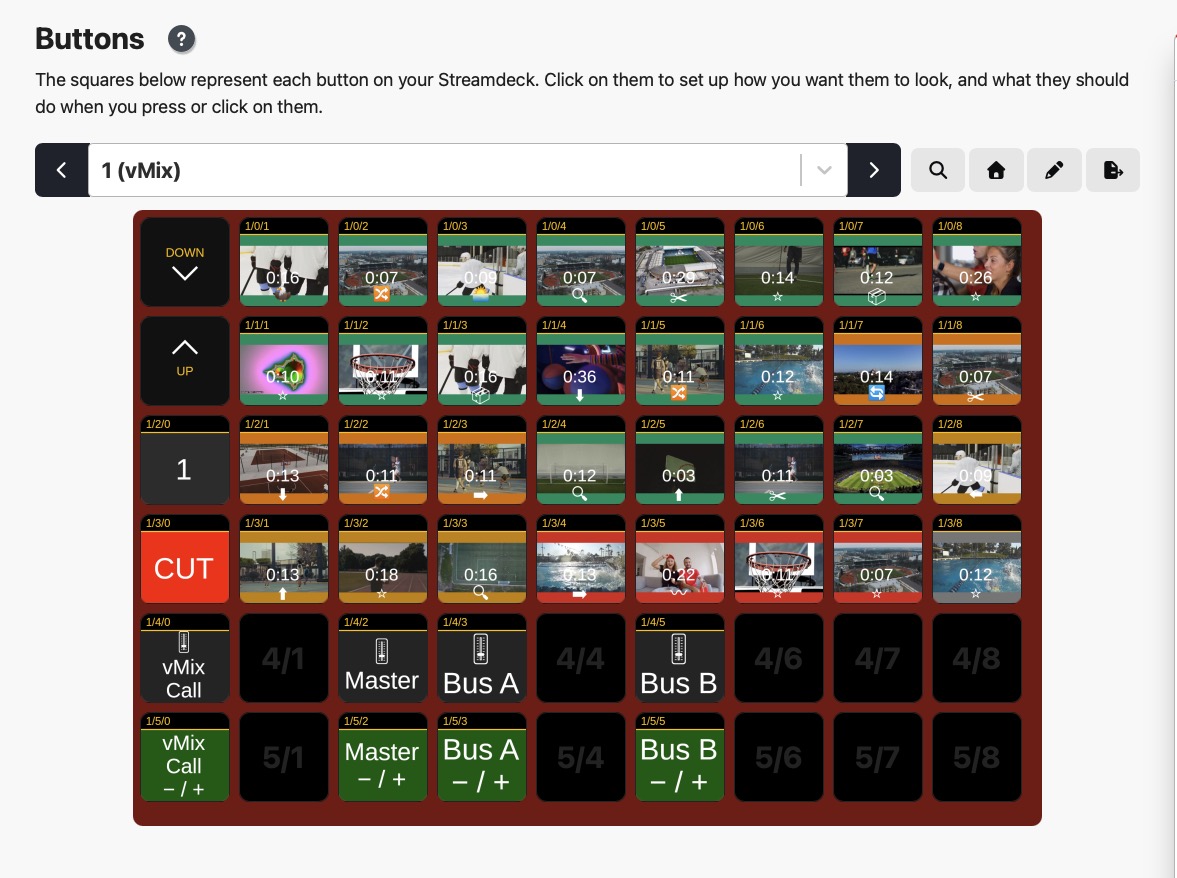
The exported Stream Deck + XL layout in Companion: cue buttons with real input thumbnails, dial rows for vMix Call, Master and Bus A/B underneath.
★ vMix categories — switch them from anywhere
- New cue command “Switch Category”: a cue can switch the category tab in the vMix operator view — jump to “Callers” before the guest block. Choreography for the operator surface, not just the program.
- CAT switcher in the timeline bar: category buttons in their vMix colors, with your own labels (“Callers”, “Graphics”, …) saved in the plan. Custom categories appear once labeled.
- CAT page in the Web Controller and in the Companion export — flip the operator view from the couch or the desk.
- Honest footnote: the vMix API can only switch categories — it can neither read nor assign them (verified up to vMix 29). That's why DP keeps its own labels; the moment vMix exposes categories in the API, we'll read them in automatically.
- Fully localized in all 20 languages.
⬇ Windows Intel/AMD64 · v1.42.202
⬇ Windows ARM64 · v1.42.202
⬇ Linux · Debian / Ubuntu (.deb) · v1.42.202
v1.42.200 — Thumbnails & connection: it just works now 📸 · one click connects to vMix on this machine — and thumbnails follow automatically. Connection fixes right on the "not connected" screen, a built-in thumbnail server when DP runs on the vMix machine, and a guided download when it doesn't.
★ Thumbnails & connection
- Not connected? The fix is right there. The “vMix not connected” screen now offers on the spot: enter an IP and connect — or one click on “vMix runs on THIS machine”, which detects and fills in the machine's network IP automatically.
- Running DP on the vMix machine? Thumbnails are automatic. Built-in thumbnail server: previews appear with no install, no firewall prompt, not a single manual step.
- DP on a different machine? When previews are missing, the input list shows a hint with a direct download of the free DP Thumbnail Server, plus a step-by-step guide in Settings. Can be turned off permanently.
- Mock save asks before saving without preview images.
- Everything localized in all 19 languages.
⬇ Windows Intel/AMD64 · v1.42.200
⬇ Windows ARM64 · v1.42.200
⬇ Linux · Debian / Ubuntu (.deb) · v1.42.200
v1.42.194 — Web Controller · turn any tablet or browser on your local network into a live touch surface for the show. Generated from the open plan — no file export — and served live by the app: fire cues, trigger replays, switch overlays, ride audio groups.
★ Web Controller
- Generated from your plan. Like the Companion export, every vMix command becomes a touch button — timeline colours, optional thumbnail. But there is no file: the surface exists only while Directors Plan runs. Every tap runs the same command logic as a click in the app (Command-Log and Mock mode included).
- Set up in seconds. Settings → Web Controller: switch the server on (port configurable, default 8570; optional 4-digit PIN). The reachable address shows as a QR code — point the tablet at it. Enable once; the server remembers its state and starts with the app. The state is saved in the plan too (“on wins”; port and PIN always come from local settings).
- Always current, hands-free. On plan open the surface is generated and pushed to all connected devices; plan changes (new cues, overlay assignments) sync automatically every 30 seconds. The new 📡 button at the left of the timeline bar pushes instantly.
- Four pages. Cues (all commands as touch buttons), Replay (one row per time, Cam 1–4 / 8, a tap marks and plays the last N seconds to output), CTRL (volume groups as big touch faders), OVL (assigned overlay channels as toggles).
- Built for touch. Tap fires; hold (or right-click on desktop) opens Play/Pause & Restart for that input. Four button sizes (S/M/L/XL) that stay physically identical across devices — only the column count adapts. Each device paginates for itself so nothing scrolls; rotating re-paginates live. Wake-lock keeps the screen awake; a status dot shows the connection.
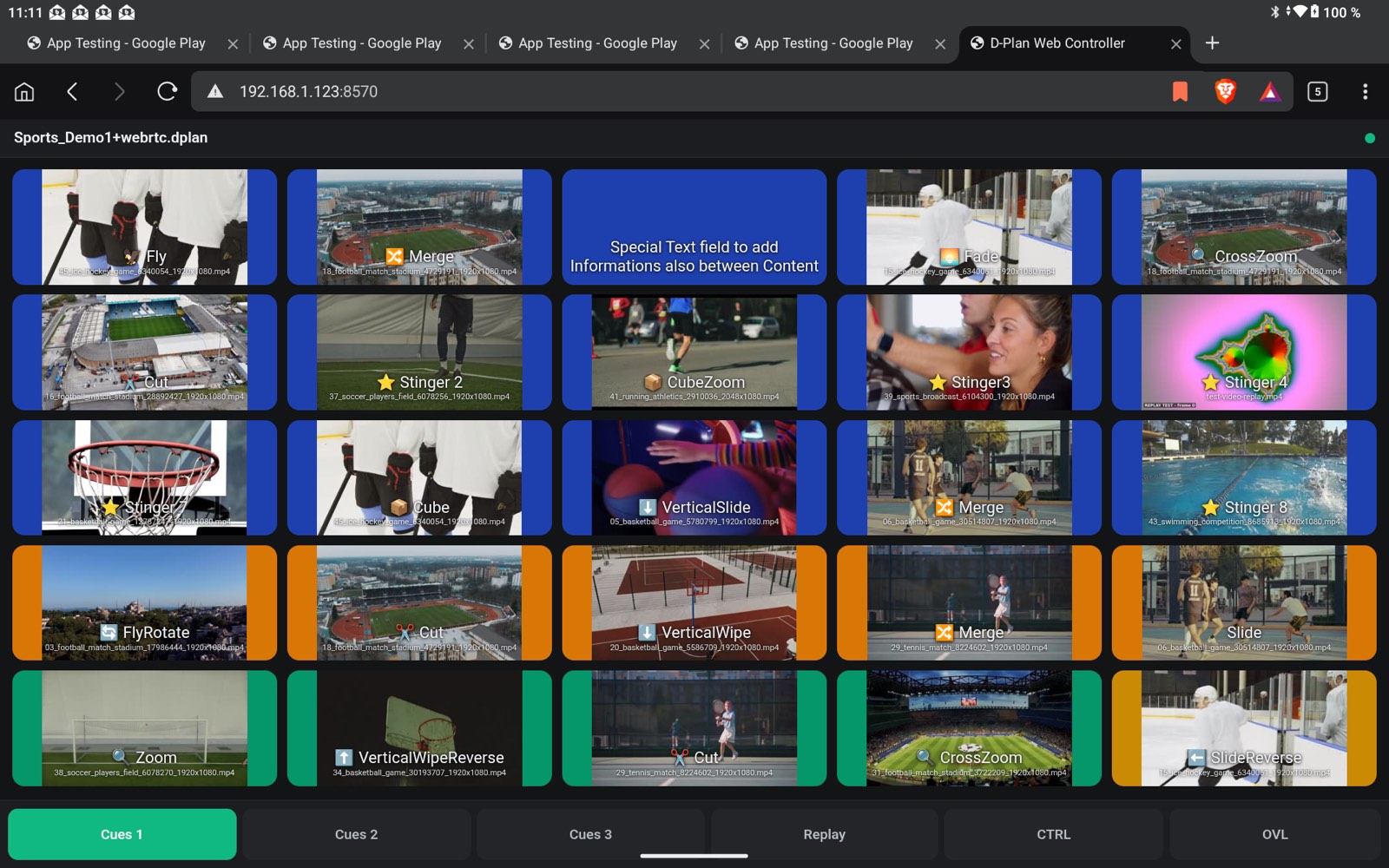
The Web Controller in a tablet browser: cue buttons with thumbnails in timeline colors, pages for Cues, Replay, CTRL and OVL along the bottom.
⬡ License & security
- The surface is served only by the running, licensed Directors Plan instance and is meant for the local production network; an optional PIN keeps curious fingers in the same Wi-Fi out.
⬇ Windows Intel/AMD64 · v1.42.194
⬇ Windows ARM64 · v1.42.194
⬇ Linux · Debian / Ubuntu (.deb) · v1.42.194
v1.42.188 — GUI redesign · a full visual overhaul that makes the whole app look and feel like one piece — cleaner, flatter, calmer. Almost the same layout you know, now with one consistent design system behind it. Also the first Linux build — a .deb for the Debian / Ubuntu family (built and tested on Ubuntu 22.04+). Other distributions can be deployed on request with a license.
★ New design
- One consistent interface across the whole app — a reworked, modern, minimal look.
- Dark and light mode fully aligned: timeline, cue editor, settings, exports and the Controller now all follow one shared colour system.
- Flatter, quieter styling: consistent buttons, input fields, dialogs and dropdowns.
- Focus rings only on keyboard use — no more distracting outlines when you click.
- Subtler scrollbars and a consistent typeface on every platform.
⬡ Right-click menus & dropdowns
- Context menus no longer clip at the bottom of the window — long menus scroll internally, and look identical in the timeline, transport bar and cue editor.
- On Windows, pop-up selects (e.g. the transition picker) now follow the chosen app theme instead of the system setting. On macOS and Linux these system menus still match the OS design.
⚠ Fixes
- Light mode: several wrong or hard-to-read colours corrected.
- Settings: the license overview shows the packages in multiple columns again on large screens.
⬇ Windows Intel/AMD64 · v1.42.188
⬇ Windows ARM64 · v1.42.188
⬇ Linux · Debian / Ubuntu (.deb) · v1.42.188
v1.42.186 — feature release · the new Controller (CTRL) — a live control surface for audio groups, real-time Master/Bus levels, streaming, recording and the vMix outputs, built and tuned on a running vMix.
★ Controller — a live control surface
- What it is. A new CTRL button in the timeline bar (same family as OVL/REP) opens a panel with five tabs — Groups · Audio Out · Stream · Output · Rec. Every button is an instantly-fired vMix action; with no vMix connection everything is cleanly disabled — no crash.
- Groups — the real gap. vMix has no group fader that rides several inputs at once (think multiple callers whose audio doesn't follow the video). Build free groups from any inputs — keyed on the GUID, so they stay stable — and one fader fires
SetVolumeon all members at once. The set level is saved in the plan. Round volume knobs per group sit right next to CTRL in the timeline bar for quick access. - Sound on/off with fade. A per-group on/off toggle (mute to 0 / back to level) as a deterministic state toggle, with a free per-group fade time in ms (
SetVolumeFade) — music bed 1500 ms, mic group 0 ms. Deliberately a level on/off, not vMix "mute", because the API mute is unreliable on call inputs. - Audio Out & live values. Master and Bus A–G as faders that show the real vMix levels and move live — even when levels are changed elsewhere (in vMix, on a hardware audio desk, a Stream Deck). Powered by the vMix TCP API (pushed in real time) plus a one-shot actual-value read on open/refresh so the faders are right from the first second. Pin Master or any bus into the timeline bar for constant access.
- Stream / Rec / Output. Start/Stop per stream number (and "all"); Recording, External Output, MultiCorder and Fade-to-Black with live status dots and confirmation toasts. The Output matrix shows Fullscreen 1/2 and Output 1–4 with the currently active source (read from the vMix API XML), switchable for Fullscreen 1/2 and Output 2–4; NDI/OMT/SRT status shown as live LEDs.
⬡ Under the hood
- Status and outputs are read from the vMix API poll that already runs — no extra load. Real-time levels come over a separate lean TCP push channel (event subscription, not polling) plus a single actual-value read on start/refresh.
- Both Controller and Append are localized across all 19 program languages (German/English complete, the rest with English fallback).
⬇ Windows Intel/AMD64 · v1.42.186
⬇ Windows ARM64 · v1.42.186
v1.42.169 — feature release · build shows modularly. DP-Append merges several show modules into one running show — the same idea as vMix's bundle-append, now in Directors Plan.
★ DP-Append — add modules to a running show
- What it does. Merge several DP show modules into one combined show without replacing the show you currently have loaded. Mirrors the vMix bundle-append workflow.
- How you use it. A split Open ▾ button — primary click = Open (replaces the show as usual), the caret = Append. Keyboard shortcut
⇧⌘O(Open without Shift, Append with Shift). The file picker takes.dplanand.yamland remembers the last folder used. - How it works. The module's cues are appended to the end of the running show — the active show, its file path and the history stay untouched. Every appended cue gets a new, collision-free ID and is tagged internally as "appended" (source = module name). The anchor is always the vMix input GUID (
InputKey) — never number or title — so cues stay correctly matched after an append. - Live / Pending. Inputs that aren't in the vMix session yet are flagged PENDING — such a cue won't fire and shows a hint. Re-Scan inputs re-reads the vMix inputs and switches PENDING cues live.
- Confirmation. On success you get "Module "{name}": {count} cues appended".
⬇ Windows Intel/AMD64 · v1.42.169
⬇ Windows ARM64 · v1.42.169
v1.42.168 — feature release · the v1.42.167 Instant Replay workflow now ships into the Companion / Stream Deck export, so the same three-call replay sequence fires from a hardware button.
★ New in this release
- Replay pages in Companion / Stream Deck export. The export dialog gets a new vMix Instant Replay section. Tick Include Replay pages in export and the generated Companion config carries dedicated replay pages with one button per cam × time preset (Cam 1
-5s/-10s/-20s, Cam 2 …). Each button fires the same three-call vMix sequence as the in-app REP panel — select cam → mark the last N seconds → play to output. - Edition-aware grid. Choose 4 cams (4K edition) or 8 cams (Pro); the page fills only the rows it needs.
- Position in the page deck. Drop the replay pages in at the top (First page(s)) or after the vMix pages, so they fit whatever Stream Deck layout is already in use.
- One page series per preset. Optional toggle: generate one page per preset (Standard / Long / Quick) instead of just the currently-active one — the operator switches presets by flipping pages, no mode-toggle mid-show.
- Stop + page-nav inline. Column 0 of each replay page reserves Next / Prev between replay pages and a red STOP button to halt replay playback — no jumping back to a different controller page.
- Cam display names carried over. The cam labels from the DP app (e.g. "Robotic Wide", "Hand-Held 2", "Crane") render straight into the Stream Deck button captions, so the operator sees the same names live as in planning.
⬡ Under the hood
- Export schema extended for the Replay command type — opens the door for HTML and CSV export to follow.
- Companion config generation reuses the existing button-grid renderer; no second export path.
⬇ Windows Intel/AMD64 · v1.42.168
⬇ Windows ARM64 · v1.42.168
v1.42.167 — feature release · trigger vMix Instant Replay with a single click straight from the Directors Plan timeline, while auto-playback keeps running.
★ New in this release
- Instant Replay panel from the timeline. New REP button right next to the existing OVL button in the timeline toolbar. One click opens a collapsible panel with all replay cameras side by side — four on the 4K edition, eight on Pro. Each cam has three time buttons (
-5s -10s -20s); a click fires the full vMix replay sequence in one shot: select cam → mark the last N seconds → send to program. Three sequential API calls, one click, no switching out of DP. - Three time presets. The time buttons cycle through three predefined presets — Standard (5 / 10 / 20 s), Long (10 / 20 / 30 s), Quick (3 / 5 / 10 s). The active selection is remembered across sessions.
- Recording toggle in the panel header. A REC indicator that doubles as a switch: grey to start recording, red to stop (with a safety confirm on stop so a running recording can't be killed by accident). Recording state is read live from the vMix XML — while recording is off, the cam buttons are cleanly greyed out with a hint, instead of firing into the void.
- Keyboard for the fast hand. While the panel is open:
,./fire the three preset times of the most-recently used cam,Escstops replay playback. Cam selection by number keys is deliberately left out —1–9in DP are already bound to preview switching. - Edition-aware. The REP button only appears when the connected vMix instance can actually do Instant Replay (4K or Pro edition) and a Replay module is active. On HD, SD or Basic editions the timeline toolbar stays unchanged — no dead button, no confusion.
- Runs alongside auto-playback. The replay workflow does not block the live show. While Directors Plan auto-plays the rundown, you can drop in a replay at any time without interrupting cue playback — vMix transitions back to the program automatically after the replay, and the plan keeps running.
⬡ Under the hood
- vMix XML polling was extended with the replay block (lives inside the Replay input, not at the top level) — no second poller.
- Edition is now correctly read as an XML child element (it was misinterpreted as an attribute before — a latent bug).
- UI strings added for all 19 supported languages.
⬇ Windows Intel/AMD64 · v1.42.167
⬇ Windows ARM64 · v1.42.167
v1.42.166 — maintenance release · one fix; auto-updates on next launch.
⚠ Bug fixes
- Auto-calc default on fresh installations. Timeline auto-calc was disabled by default on fresh installs due to a legacy config flag. It now works correctly out of the box.
⬇ Windows Intel/AMD64 · v1.42.166
⬇ Windows ARM64 · v1.42.166
v1.42.164 — major update · full Video List support, vMix 29 update, CSV rundown export, generic HTTP command, and surgical auto-playback control.
★ New in this release
- Video List — full integration. vMix only exposes the duration of the currently active item in a Video List. Directors Plan now measures each item on demand (~200–300 ms per item) by briefly cueing it to Preview, then restores the original index. Durations persist in the plan and in mock files and feed the timeline, auto-playback waits, HTML/Companion exports, and Streamdeck button labels. Three measurement modes from the timeline right-click menu: single item, from-item-to-end, or full list — with a cancellable progress overlay and 5-second per-call timeout. Dedicated Commands Builder category with Select Video List, Video List Item (index + optional transition in one call), and Next / Previous Item. Drag & drop of single items or whole lists from vMix Controls. Right-click editing of index and transition on existing commands, with the cue duration recomputed immediately. ⏮ / ⏭ quick-action buttons on timeline thumbnails. All 19 UI languages updated.
- vMix 29 compatibility. Stinger 1–8 (was 1–4) everywhere — Commands Builder, transport buttons, Settings default, auto-playback, timeline drops, CueEditor, Companion and HTML export. 16 overlay channels (was 8) with scrollable timeline popover and CH 1–16 cue-overlay assignments. Both overlay XML formats parsed in parallel so older vMix versions keep working.
- CSV rundown export — for client sign-offs. Built for the review round with the customer: many clients cannot open HTML files (corporate security policies), while CSV opens and edits instantly in Google Sheets, Excel and Numbers.
- Configurable columns — every column toggled by checkbox. Headers come out in the active app language (Pos, Length, Live/Graphic, Segment, Location, Technical Notes …) using the same i18n keys as the rest of the app.
- Default ON: Pos / Length (combined into one cell — Pos on the first line, Length on the second; each also toggleable individually); Live/Graphic (segment header with the user-chosen column name, e.g. "Topic", "Segment", "Sport"); Content (cue description); Commands — all vMix / HTTP commands of the cue in readable form, each one on its own line inside the cell, line-break separators render as real blank lines (just like in the timeline). Examples:
Cut: Camera 1,Item 3 (03_football.mp4) → Stinger3 · List 1,HTTP POST https://hooks.example.com/show-start. - Default OFF: Location, Technical Notes, Overlay channels — switchable on demand.
- Default ON: Pos / Length (combined into one cell — Pos on the first line, Length on the second; each also toggleable individually); Live/Graphic (segment header with the user-chosen column name, e.g. "Topic", "Segment", "Sport"); Content (cue description); Commands — all vMix / HTTP commands of the cue in readable form, each one on its own line inside the cell, line-break separators render as real blank lines (just like in the timeline). Examples:
- Optional plan header above the cue table, each as its own block separated by a blank line: Basic Data (show, prod-no, version, date, from/to, length, plus all custom fields from "Basic Data Extra"), Schedule (multi-line), Contacts (all dynamic contact blocks with field labels and values).
- Excel- and Sheets-compatible — UTF-8 with BOM so Excel renders umlauts, accents and Asian scripts correctly; separator selectable (comma — default / international / Google Sheets, or semicolon — for Excel with German locale where the comma is the decimal separator); CRLF line endings; proper quoting for values containing the separator, quotes or line breaks.
- Configurable columns — every column toggled by checkbox. Headers come out in the active app language (Pos, Length, Live/Graphic, Segment, Location, Technical Notes …) using the same i18n keys as the rest of the app.
- Generic HTTP Request command. New Special command to hit any HTTP endpoint — not just vMix. URL, method (GET / POST / PUT / PATCH / DELETE / HEAD), body with configurable Content-Type. Companion export carries it through as the matching HTTP action, runnable directly from a Streamdeck button. Useful for light desks with web APIs, info displays, Slack/Discord show-start webhooks, or third-party streaming gear.
- Start from this cue — manual auto-playback override. Every cue row gets a small ▶ play button. First click arms it (orange + pulse, 5-second confirmation toast); second click stops any running auto-playback and starts immediately from that cue. While the cue is on program, the button turns green. Two-click gate prevents accidental jumps during live shows; the drag handle next to it stays fully functional.
- Under the hood. 5-second HTTP timeout via a real
AbortController(browsers ignore thetimeoutoption. - Backwards compatible. Plans from v1.42.140 and older open without migration, conversion, or user action — all new fields are optional. Existing commands (Cut, Fade, Stinger 1–4, Overlay 1–8, SelectPlayList …) run unchanged; new command types appear only when you actively use them.
✦ Core features
- Visual timeline with drag-and-drop rundown creation and frame-accurate playback
- Full vMix integration — inputs, transitions, overlays, audio control
- Live override with shortcuts and re-triggerable cues
- Mock Mode for offline planning without vMix connection
- Stream Deck / Companion 3 export with thumbnails
- HTML, PDF & CSV call sheet / rundown export
- Companion App export for mobile crew reference
- 20+ supported languages
- 30-day free trial — every feature unlocked, no credit card required
- Multi-license discounts (3 seats: 15 %, 5 seats: 20 %, 10+: contact)
- Companion: DP Thumbnail Server — open source, free on GitHub
⬡ Platforms
- macOS Universal (Apple Silicon & Intel)
- Windows 10/11 — Intel/AMD64 + ARM64 installers
v1.3.042 — localization update · menu bar app UI fully translated to English; auto-updates on next launch.
⬡ Improvements
- Menu bar app: German → English. Menu labels, popover strings and tooltips translated from German to English for the international release.
ℹ️ MDE — Mix Desk EQ is retired — its successor is MixDesk X (free, macOS & Windows). MDE 1.3.042 is the final version, keeps working, and stays downloadable here.
⬇ Download MDE Apple Silicon v1.3.042 (final)⬇ Download MDE Intel v1.3.042 (final)
Live release — professional audio routing for macOS. Apple Silicon and Intel builds available.
✦ Features
- Multi-channel mixer with flexible input channels and up to 4 stereo output busses
- 3 audio source types per channel: microphone/hardware input, system audio, single-app audio (ScreenCaptureKit)
- Per-channel: Gain (-20 to +40 dB), Constant-Power Pan, EQ (2/3/11-band), Mute & Solo, vertical Fader with RMS meter
- Per-output-bus: own Fader, EQ, Output Delay (0–1000 ms for Bluetooth latency compensation), Mute, color-coded
- Internal format: 48 kHz / 32-bit float, automatic sample-rate conversion
- Low-latency direct path (RingBuffer → SourceNode) for 48 kHz stereo inputs
- Adjustable buffer: 128–2048 samples (from 2.67 ms latency)
- Auto device recovery on disconnect (per-bus, no cascade)
- 3 power modes: Always On, ECO (auto-suspend after 60 s), ECO Sleep
- JSON-based preset system (Save / Load / Auto-load on launch)
- Menu bar app with mini-mixer popover
- Free Audio Driver Installer (BlackHole-based, up to 8 virtual stereo devices) — also on GitHub
- 14-day free trial, 30-day offline grace period after activation
⬡ Platforms
- macOS 13+ · Apple Silicon build (universal Apple Silicon)
- macOS 13+ · Intel build (separate installer)
⬇ Download MDE Intel v1.2.042
v1.7.3 — the licence check can no longer lock you out. A problem on the licence server used to be read as "invalid licence". It no longer is: if the server does not answer, LLT carries on with the last confirmed licence and simply tries again later. The check now runs once a day instead of on every start, a key that cannot possibly be valid is recognised before anything is sent, and a licence that the server explicitly reports as invalid or suspended still takes effect immediately. A leftover development shortcut in the licence check was removed.
v1.7.1 — the deactivation dialog, properly fixed. The confirmation is now attached to the Settings window as a sheet, so it can never open hidden behind other windows again. Installs itself in-app if you're on v1.7.0.
v1.7 — the first update that installs itself. Coming from v1.6.5 or earlier? Grab the DMG one last time — it's the final manual download.
v1.6.6 — LLT now updates itself. No more downloading DMGs by hand: when an update is available, one click installs it from inside the app.
★ In-app updates
- "Install Update" does everything — LLT downloads the new version, verifies it, installs it and relaunches. Done.
- Verified before anything is touched — the downloaded app must carry a valid Apple code signature from our Developer ID, or the update is refused and your current version keeps running.
- Safe by design — if any step fails, LLT falls back to the classic download page. Nothing is replaced until the new version is fully verified.
v1.6.5 — setup without Homebrew, and Parakeet is back. The backend setup no longer installs anything system-wide, and a change introduced in one of the underlying speech libraries that could leave the Parakeet engine silent has been fixed. Still 100% local.
★ Truly self-contained setup
- No more Homebrew — LLT now downloads its own private Python runtime (~27 MB) into its Application Support folder. No Terminal, no admin password, nothing installed system-wide, and nothing left behind: Remove Backend cleans it all up.
- Existing Homebrew setups stay untouched — if you already have Homebrew, LLT simply doesn't use it anymore.
- Pinned, tested library versions — the setup now installs the exact library versions this release was tested with, so a fresh install always behaves like the tested build.
⬡ Fixes
- Parakeet could stay silent — a newer version of the underlying Parakeet/MLX speech libraries introduced a change (thread-local processing streams) that required an adjustment in the app. Dictation and translation with Parakeet now deliver text again; existing installs get the fix automatically via the in-app backend update prompt.
- Important for existing users: please remove the backend once and run the setup again (right-click the menu-bar icon → "Install / Repair Backend…" → Remove backend, then Install) so Parakeet runs on the new, tested Parakeet/library versions. Your settings are kept.
- Removing the backend now shows progress and confirms when it's done.
v1.6.4 — the backend now sets itself up, right inside the app. Fresh installs no longer need a separate Terminal script: LLT installs its local backend itself, in a proper setup window. Still 100% local. Auto-updates on next launch.
★ In-app backend setup
- Native setup window — pick your Whisper model, optionally add Parakeet, and watch a live progress log as it installs. No Terminal, no loose script.
- Opens automatically on first launch when the backend isn't set up yet — nothing to run by hand.
- Re-open it anytime from the menu-bar icon: "Install / Repair Backend…". A Reset there reinstalls the backend cleanly and keeps your settings.
- At most a single admin prompt (only if Homebrew still needs installing); everything else runs without it.
⬡ Fixes & convenience
- Fixes a macOS 26 (Tahoe) issue where the old
Install-Backend.commandcould be blocked by Gatekeeper when run straight from the disk image. The setup now lives inside the notarized app, so it just works. - Simpler disk image — just drag the app to Applications and launch; it takes care of the rest.
v1.6.3 — dramatically faster, more engines, more control. Performance was rebuilt from the ground up: recognition is noticeably snappier and the first sentence appears far sooner. Still 100% local. Auto-updates on next launch.
★ New local engine — Parakeet (now the default)
- Parakeet (NVIDIA TDT v3, MLX, Apple Silicon) — a second, very fast local speech engine, now the default. Noticeably faster recognition, the first sentence appears far sooner.
- Continuous streaming — text flows along live instead of only appearing at the end of a sentence.
- Dedicated "Parakeet" tab with timing sliders — tune "pause response time" and "max. sentence length without pause" to your speaking style: speed vs. clean sentences.
- Parakeet auto-detects the language; Whisper remains the multilingual, language-pinnable alternative — pick per task.
★ Dictation polish
- Optional dictation polish — a local LLM cleans up punctuation and grammar of the dictated text (same language, no translation). Cleaner text, fully offline.
⬡ Overlay & output
- Optional live preview — your spoken original runs live in the overlay; the translation fills in once the sentence completes. Fixed positions, no jumping.
- Consolidated "Output" tab — overlay colors, OBS, vMix and VRChat in one place.
⬡ Setup & convenience
- First-run onboarding — choose your audio source (Mac mic or iPhone over the network) plus a permissions checklist with live status.
- Uninstaller for clean removal, and "Reset to defaults" in settings.
- Smarter defaults: Parakeet as default, target language = system language, original shown in the overlay by default.
- The OBS overlay URL now shows the LAN IP directly — easier OBS / browser-source setup.
v1.4.0 — Dictation, iPhone microphone & more. Speak straight into any app, use your iPhone as a wireless mic to remote-start the Mac. Auto-updates on next launch.
★ Dictation mode — speak straight into any app
- Type into any app (⌘⌥D) — speak and the recognized (optionally translated) text is typed straight into whatever app has focus: Mail, Word, Notes, browser, editor. Global hotkey or the menu-bar menu. To type into other apps, macOS asks once for the "Accessibility" permission.
- Choose content & mode — insert original only, translation only, or both; pick "Final" (completed sentences) or "Live" (types as you speak, self-correcting).
- LocalAgreement — a streaming algorithm that brings smooth, flicker-free live typing even to fully local, 100% offline Whisper.
★ iPhone as a wireless microphone
- With the free LLT Mobile app, your iPhone streams its mic to the Mac over Wi-Fi and can remote-start dictation or translation on the Mac — a reliable replacement for Continuity.
⬡ More
- Automatic in-app backend update — an outdated backend is detected and updated safely, with automatic rollback and no new model downloads.
- OBS / browser overlay & VRChat (OSC) — customizable overlay colors; long sentences are no longer truncated.
- Localized interface (DE / EN / ES / FR / IT).
v1.2.5 — subtitles now go to OBS and VRChat, plus the fully customizable overlay. Auto-updates on next launch.
★ Subtitles now in OBS and VRChat too
- OBS overlay (browser source) — LLT serves a transparent subtitle page; just add it in OBS via "Source → Browser" using the shown URL. Translations appear live in your stream, in the same style as the on-screen overlay.
- VRChat output (OSC) — subtitles are written directly into the VRChat chatbox (like Kikitan). Choose whether to send the original, the translation, or both — including a test button and an optional notification sound.
⬡ Overlay improvements
- Long translations are no longer truncated ("…"). Text now wraps and the overlay window resizes its height automatically.
- Overlay colors are now fully customizable — background, text color, colored border and opacity. New, more visible default: semi-transparent light green with black text and a green border.
⚠ Bug fix
- "Show Original Text" works correctly again and persists across restarts.
v1.2.3 · overlay improvements and a fix; auto-updates on next launch.
⬡ Overlay improvements
- Long translations are no longer truncated ("…"). Text now wraps and the overlay window resizes its height automatically — everything stays readable, even with fast speakers.
- Overlay colors are now fully customizable — background, text color, colored border and opacity (Settings → Display & Audio). New, more visible default: semi-transparent light green with black text and a green border.
⚠ Bug fix
- "Show Original Text" now works correctly — the setting is respected and persists across restarts.
v1.2.2 — maintenance release · one fix; auto-updates on next launch.
⚠ Bug fixes
- Transcript writing on cloud engines. TXT and SRT transcripts are now saved correctly when using the direct cloud engines (Google REST, Google gRPC, Deepgram, AssemblyAI, Azure). Previously the transcript file was not being written for these paths.
Live release — real-time speech translation, 100% local on Apple Silicon. Now with vMix Title Output, Google gRPC true-streaming STT, and the free LLT-Mobile iOS companion app.
★ New in this release
- Google gRPC Streaming STT — new true-streaming path through the Python backend. Flow: audio → backend → Google gRPC STT (real streaming, no VAD required) → backend returns recognized text (
skipTranslation: true, Mistral is skipped) → Swift calls Google Translate REST directly using the same API key → original + translation are displayed. Requires the backend running,google-cloud-speechinstalled in the Python venv, a Service Account JSON, and a Google API key for Translate. Restart the backend after enabling. - STT Engine matrix — seven engines, each pairing a speech-to-text source with a translation provider. Some run fully local, some call the cloud directly, some go through the backend:
| Engine | STT | Translation | Backend? |
|---|---|---|---|
| Whisper | Whisper (local) | Mistral (local) | yes |
| Google REST | Google STT (direct) | Google Translate (direct) | no |
| Google gRPC | Google gRPC Streaming (via backend) | Google Translate (direct) | yes |
| Deepgram | Deepgram Streaming (direct) | Google Translate (direct) | no |
| AssemblyAI | AssemblyAI Streaming (direct) | Google Translate (direct) | no |
| Azure | Azure STT + Translation (direct, one call) | Azure | no |
| Vosk | Vosk (local, via backend) | Mistral (local) | yes |
- vMix Title Output — send translations directly to vMix as live title updates via the Web API. Includes Lower Third .xaml template
- Smart Pause Detection (VAD) — waits for natural pauses, produces cleaner sentences and dramatically better translation quality. VAD is set automatically per engine — streaming engines detect pauses server-side.
- Whisper Model Selection — 5 models (tiny / base / small / medium / large), download/switch/delete on demand
- Network Access & LLT-Mobile — free iOS companion app: wireless mic or standalone audio source via Wi-Fi
✦ Core features
- 3 audio inputs: microphone, system audio, single-app audio (ScreenCaptureKit)
- 101 target languages with auto source-language detection
- Live floating overlay, TXT transcript, SRT subtitle export
- Text-to-Speech output, Auto-Gain, Manual Gain
- Mistral 7B 4-bit MLX for local translation, on Apple Silicon (GPU + CPU)
- Menu bar app — backend auto-start, status icon, popover control panel
- 5 UI languages: DE, EN, ES, FR, IT
- 14-day free trial, 30-day offline grace period after activation
⬡ Platforms
- macOS 13+ · Apple Silicon only (M1/M2/M3/M4)
- 8 GB RAM minimum (base model), 16 GB recommended (medium/large)
Volume Balance is now completely free. The trial, the paywall and the license system have been removed — no purchase, no key, no account. Everything that used to be paid is simply included.
✦ Changes
- Free for everyone — the 5-minute trial, the $3.99 purchase and the license activation are gone entirely
- All features included: broadcast-quality compressor, master volume, 5 built-in presets (Standard, Social Media, Video/Streaming, Night Mode, Gentle) and unlimited custom presets
- Set & forget as before: pick a default preset once and every video on every page just sounds right
- Still no account, no tracking — no data leaves your browser
⬡ Platforms
- Chrome Web Store — Chrome, Edge, Brave and other Chromium browsers
- Mozilla Add-ons — Firefox
- Android via Kiwi Browser — load the Chrome version
Live release — Volume Balance is now available on Chrome and Firefox. Real audio compressor for your browser, purchase happens inside the extension.
✦ Features
- Professional Web Audio API DynamicsCompressor: Threshold, Ratio, Knee, Attack, Release, Makeup Gain
- Master Volume (0–200 %) — balance audio between browser tabs or against other apps
- 5 built-in presets (Speech, Music, Video, Night Mode, Gentle) plus unlimited custom presets
- Per-tab on/off toggle, real-time gain reduction meter
- Set a global default preset — every video on every page just sounds right
- 5-minute free trial, then $3.99 one-time (purchase inside the extension)
- No account, no tracking, no data leaves your browser
⬡ Platforms
- Chrome Web Store — Chrome, Edge, Brave and other Chromium browsers
- Mozilla Add-ons — Firefox
- Android via Kiwi Browser — load the Chrome version
⚠ Limitations
- DRM-protected content (Widevine, e.g. Netflix, Disney+) bypasses browser extensions and cannot be processed
Versions and download links are loaded automatically from the live update manifests.