The professional rundown & control software for vMix live productions. Plan your show, automate execution, export call sheets & Stream Deck configs — all in one app.
⬡ for vMix · macOS ⬡ Windows ⬡ 20+ Languages ⬡ 30-Day Free Trial ⬡ Launch: $99
Timeline view with live playback, vMix thumbnails, color-coded cues, and vMix input browser
Build your show visually — drag vMix inputs, set transitions, add cues. See thumbnails for every video, graphic, and camera.
Press Play for full automation with frame-accurate timing — or control manually at any time. Schedule starts, set loops, get warnings.
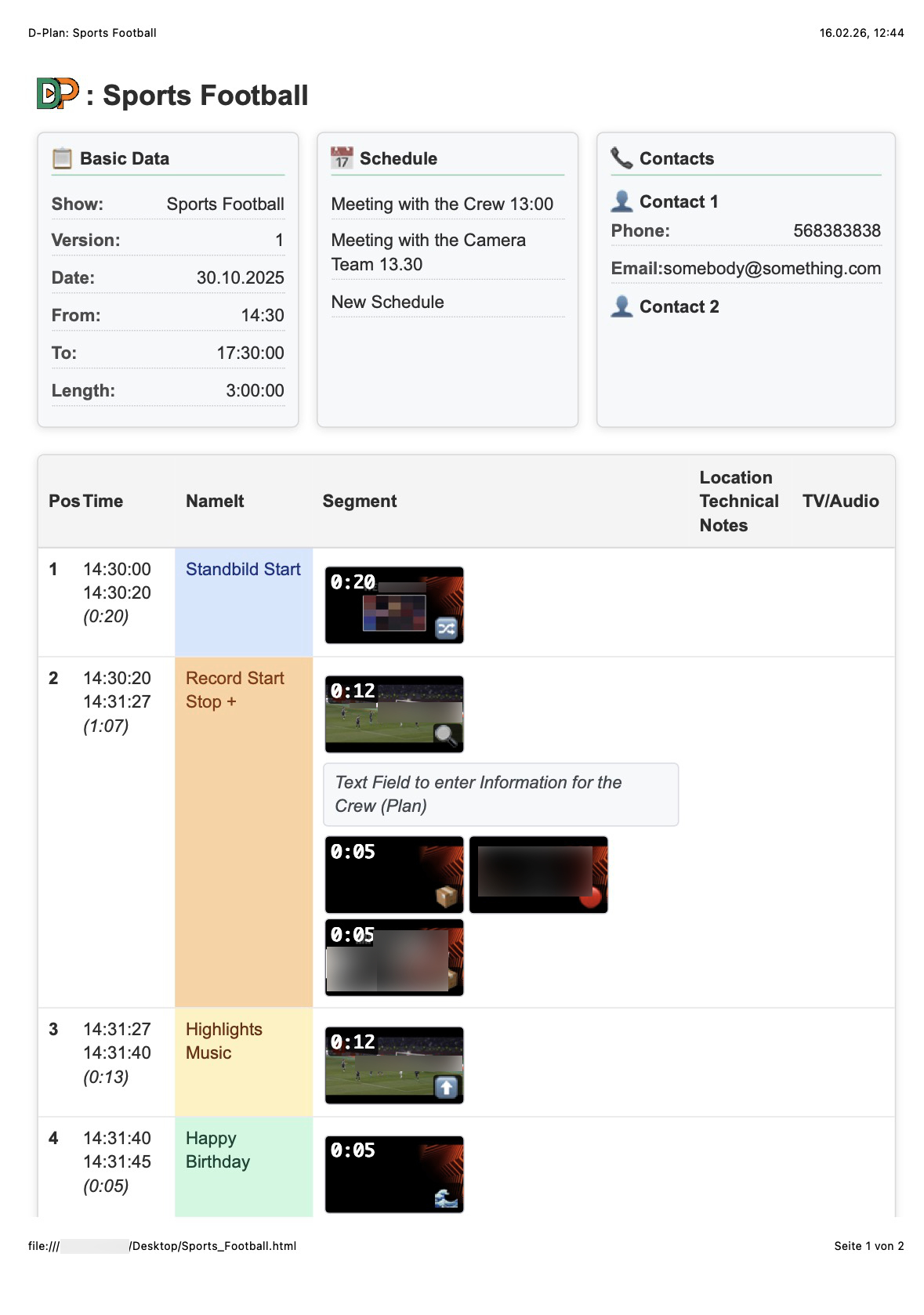
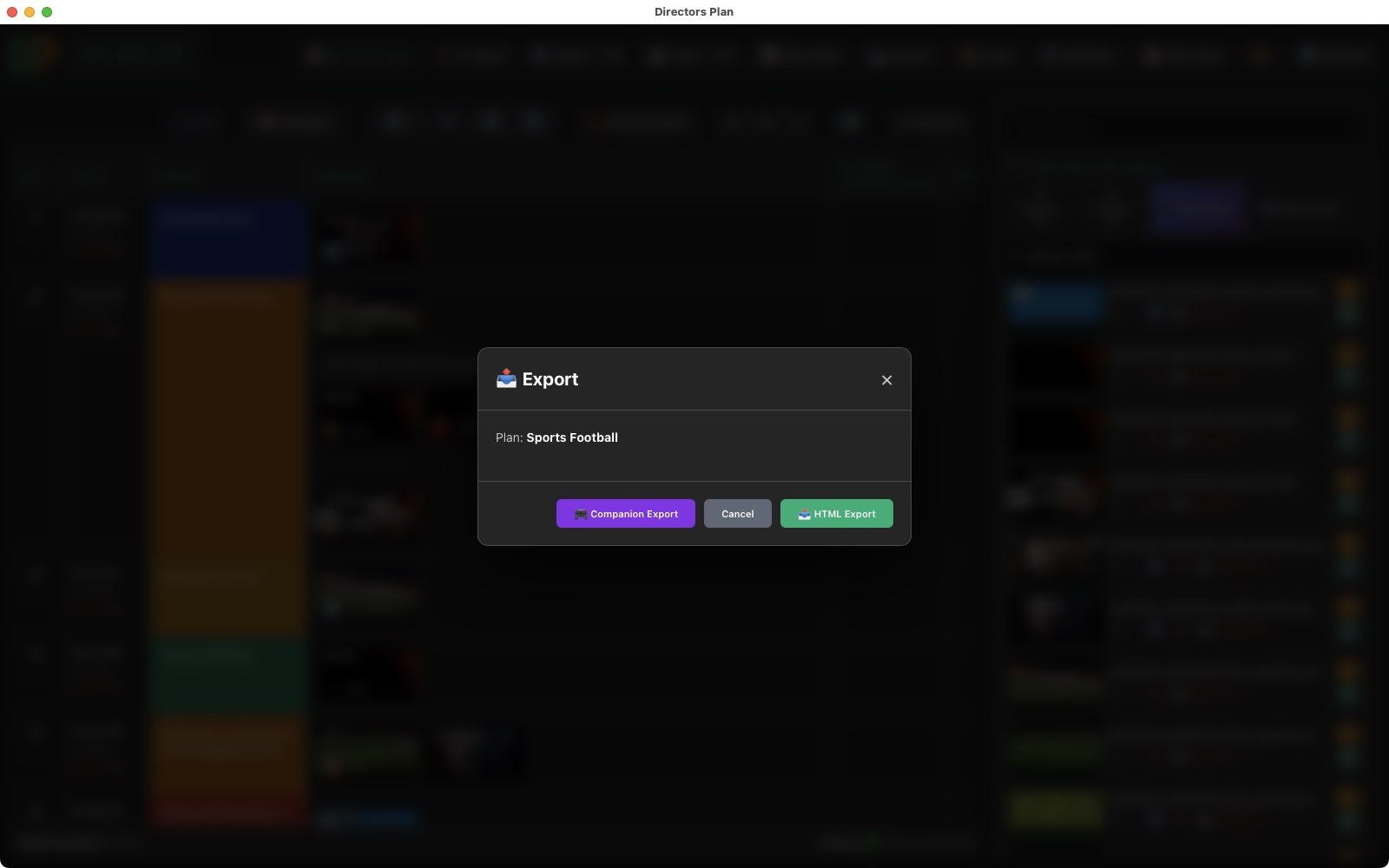
Print production call sheets as HTML/PDF. Export Stream Deck configs with thumbnails. Share plans with your crew — one file, everything included.
In film it's the call sheet. In TV it's the rundown. Directors Plan creates both — and executes them live.

Most vMix tools only control. Directors Plan also plans and documents your entire production — with show metadata, schedules, contacts, and visual cue sheets with instructions for camera operators, sound engineers, live reporters, and moderators.
Export your complete rundown as a responsive HTML page — with embedded thumbnails, time codes, crew instructions, and notes. Three size modes (S/M/L), keyboard navigation (1–0 + Enter), Next-mode for live stepping, and direct vMix command links. View on tablet, print for the floor, email to talent.
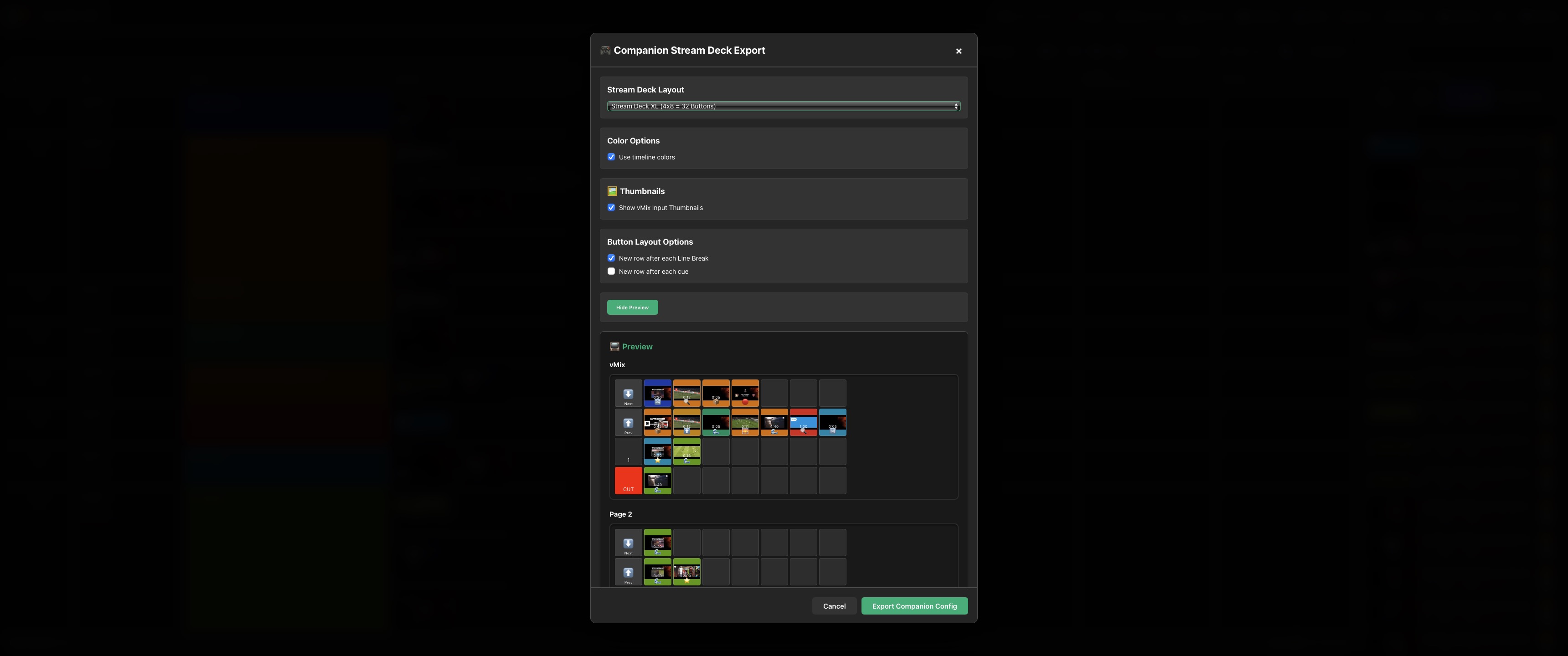
One click generates a complete Companion 3.x config. Choose your Stream Deck layout (Mini 6, Standard 15, XL 32, Plus 8 buttons), use timeline color-coding or pick a custom color, toggle thumbnails on every button, and control row-break behavior per cue. Live preview before export. Anyone who has tried to set this up manually in Companion knows — even one button with the right vMix command, thumbnail, and color takes minutes. Directors Plan does all buttons in seconds.
Show name, production number, dates, schedules — add unlimited custom fields and contact blocks, each with their own custom sub-fields. Only populated fields appear in exports. Add your SVG logo for branded call sheets. Everything is dynamic: add blocks for sound, lighting, or any department, remove what you don't need.
Plan, preview thumbnails, mock data, show metadata — all in a single file. Send it to another director to prep remotely, put it on a USB stick, email it. No extra folders, no broken links, no dependencies.
vMix generates preview images for every input — Directors Plan captures and embeds them in both the plan file and mock saves. Thumbnails travel with your plan everywhere: timeline, exports, Stream Deck buttons, and printed call sheets.
From pre-production to live execution — every feature designed for real-world broadcast workflows.
Drag & drop vMix inputs from the sidebar — the default transition is configurable in settings (22 options). Right-click any cue to change commands or videos after the fact. Reorder cues by dragging — all times recalculate automatically. Color-coded rows, live thumbnails, customizable columns. The Cue Editor lets you add text fields, separator lines for visual organization, and crew instructions per cue. Text-to-Link turns any text into a clickable vMix command.
Automatic execution with precise timing, countdowns, and warning system. Optionally restarts all videos, PowerPoints, and media to position 0 before playback starts. Loop mode, scheduled starts with repeat. Full manual override at any time — preview or cut to any input via keyboard while the plan keeps running.
Auto-built from your live vMix instance with categorized inputs, proxy thumbnails, and search. Drag any input into your timeline — the default transition is configurable (22 options: Cut, Fade, Zoom, Wipe, Slide, Fly, Cube, Merge, Stinger 1–4, and more). Stable input IDs ensure commands stay correct even when sources are reordered in vMix.
Visual editor for 50+ vMix commands: 22 transitions (Cut, Fade, Zoom, Wipe, Slide, Fly, CrossZoom, Cube, CubeZoom, Merge, VerticalWipe, Stinger 1–4, and all Reverse variants), plus overlays, audio, recording, streaming, text, and countdown commands. Execute and preview instantly.
Save a complete vMix snapshot as a mock — all inputs, all thumbnails, everything embedded in one file. Plan offline on the train, at home, anywhere. Send the file to another director who preps remotely. Or receive a vMix bundle + plan file and run the full automated show on-site. The crew gets printed call sheets, the director gets automation.
Auto-detect video lengths from vMix metadata. Configurable default duration for cameras and images (min:sec). Batch-update all cue durations in one click. Auto-calculation toggles per project.
While the automated plan runs, you keep full control: preview or cut to any input, play/pause/restart videos, loop, skip to next/previous — all via keyboard or mouse. The plan continues seamlessly. Autopilot with a manual override.
Select any text in your cue and turn it into a live vMix command link — in the app and in HTML exports. Crew members viewing the call sheet on a tablet can tap a linked word to trigger a camera switch, overlay, or any vMix function directly from the browser.
8 overlay channels with show-level and cue-level control. Exclusive or Additive mode per channel — toggle any overlay via Ctrl+Shift+1–8 during playback. Scoreboards, lower thirds, logo bugs, tickers — all automated per cue.
Smooth volume crossfades when switching inputs with configurable target volume and fade duration. Automatic audio bus routing (Master, A–G). Auto-restart media before playback, default transitions per project.
Automatic logging of all vMix commands and playback states. Daily log files, built-in viewer with auto-refresh, and quick folder access.
Complete vMix control from the keyboard. Input 1–10 instantly on Preview or cut direct to Program. Play/Pause, Restart, Next/Previous, Loop — each with Shift to toggle between Preview and Program. Perfect for live camera switching, restarting a forgotten video, or stepping through PowerPoint slides mid-show. All shortcuts work while the automated plan is running.
vMix Shortcuts (when connected)
File Shortcuts (always active)
macOS: F-Keys may require Fn key or System Preferences → Keyboard → "Use F1, F2 as standard function keys"
Full control over 8 vMix overlay channels — globally for the entire show or per cue. Toggle overlays with keyboard shortcuts, set them to auto-activate during playback, and choose how show-level and cue-level overlays interact.
Define up to 8 overlays that stay active for the entire show. Assign any vMix input per channel. Each channel can be set to ON (active during playback), manual-only (toggle via shortcut), or OFF. Choose between Exclusive and Additive mode — Exclusive turns off show overlays when a cue has its own overlay on the same channel, Additive keeps both active.
Any cue can activate or deactivate overlays on specific channels — scoreboards, lower thirds, logo bugs, tickers, stinger frames. Cue overlays fire automatically when the cue starts during playback. Set per channel whether the cue adds to or replaces the show-level overlay. Perfect for sponsor logos during ad breaks, scoreboards during game time, or speaker titles during segments.
Ctrl+Shift+1–8 toggles each overlay channel instantly — during automation or anytime. No mouse needed.
Global setting per channel: Exclusive replaces show overlays when a cue overlay fires. Additive keeps both. Mix modes across channels for maximum flexibility.
Show overlays run the whole show (logo bug, ticker). Cue overlays activate only for that cue (scoreboard, lower third). Both work together seamlessly.
Professional audio handling built into the automation engine — crossfade volumes, route audio buses, and fine-tune playback behavior per project.
Smooth volume crossfades when switching inputs. Configurable target volume (0–100%) and fade duration in milliseconds. No more hard audio cuts between sources.
Enable automatic audio bus routing when switching inputs. Set a default bus (Master, A, B, C, D, E, F, G) — Directors Plan handles the routing so the right audio goes to the right output.
Auto-restart videos before playback, configurable default duration for cameras/images, default drag & drop transition (22 options). All settings per project — different shows, different configs.
vMix is powerful but has no built-in timeline, rundown, or call sheet system. Directors Plan fills that gap.
The only software that combines visual rundown planning with fully automatic vMix execution.
Preview images in timeline, controls, Companion buttons, and HTML call sheets. Your crew sees what happens.
Plan your rundown, print call sheets with instructions for camera, sound, and talent, export Stream Deck buttons — then press Play. One tool, complete workflow, every department covered.
Features that compete with $5,000+ broadcast software — one version with everything at $199 (launch: $99). No subscriptions, no feature-gating, no upsells. Buy once, use forever.
From printed call sheets to Stream Deck buttons — your plan goes everywhere your crew needs it.

Responsive rundown with dynamic plan header, contacts, schedules, embedded thumbnails, crew instructions, and S/M/L sizing. Only populated fields are included. Print, view on tablet, or email.

Choose layout (Mini/Standard/XL/Plus), timeline colors or custom, thumbnails on/off, row-break options. Live preview before export. Manual setup in Companion takes hours — this takes one click.

Save a vMix mock with all thumbnails embedded — send the plan file to another director to prep remotely. Or receive a vMix bundle + plan and run the full show on-site: automated, printable, on tablet for crew.
From weekly services to major broadcasts — Directors Plan adapts to your workflow.
Automated intros, lineups, ad breaks, halftime, credits. Duplicate plans between games — 15 min prep.
Weekly services on autopilot. Volunteers press Play, lyrics advance. Reuse templates every week.
Keynotes, product launches, galas. Visual call sheets for client sign-off, perfect sponsor timing.
YouTube, Twitch, web shows. Consistent quality with templated intros, sponsors, and outros.
No feature-gating, no tiers. Every license gets the full Directors Plan experience.
🚀 Launch Price — $199 after launch
Lifetime license for v1. All v1.x updates included. Plus applicable sales tax.
Launching April 2026 — 30-day free trial
📦 Multi-License Discounts
Everything included:
Generate preview thumbnails for every vMix input — videos, NDI, cameras, PowerPoint, overlays. Runs on the vMix machine, serves thumbnails to Directors Plan and any browser on the network.
Replaces vmix-snapshot-proxy — faster, zero-configuration, supports all input types including NDI, cameras and overlays. Stable key-based URLs that survive input reordering.
Uses the vMix SnapshotInput API to capture preview images of all inputs. Install ffmpeg (winget install ffmpeg) to get optimized 320×180 thumbnails for fast loading. Auto-refresh keeps live inputs up to date.
Directors Plan is the flagship product. More professional tools at adelvo.io
Browser extension that fixes the #1 annoyance on social media and video pages: wildly different volume levels. Audio compressor with Threshold, Ratio, Knee, Attack, Release, and Makeup gain. 3 built-in presets plus save your own. Set a standard preset and every video on every page just sounds right. Chrome, Firefox, Safari.
Professional audio routing for macOS — capture individual app audio, mic, webcam, and line-in simultaneously and route each to different outputs. Up to 4 stereo outputs with optional 2/3/11-band EQ and gain on every input and output — all individually toggleable for cleanest signal path. Includes free audio driver installer for multiple stereo in/out pairs.
On-device LLM translation using Apple Silicon. App or mic input with real-time overlay. Private, fast, no cloud.
30-day free trial. All features included. macOS & Windows. Launch price: $99 one-time (regular $199).